
简介:
eBook Converter Bundle 3.25.10120 (300) macOS [U2B]
macOS [U2B] | 多语言 | 大小:18.4 MB
eBook Converter Bundle是一个实用程序,可以从合法购买的电子书中删除DRM保护,并将其转换为可用格式。它将保护移除与后续转换两项功能集成于同一款应用中。
该应用程序允许您 “免费” 购买的书籍被绑定到特定的商店或设备。您只需添加文件,应用便会移除保护,并在一键操作中提示您选择目标格式。
将Kindle,EPUB和PDF书籍的文件夹放到队列中,然后将它们作为Apple books,Kindle或文字处理器可以打开的文件写出。
队列实际接受的格式
ebook-converter.com的供应商将其作为多个商店库的一个转换器出售,而不是每个商店一个单独的应用程序。记录的输入包括已经下载的Kindle,Adobe Digital Editions,Google Play,Sony,Kobo (包括kepub),Barnes和Noble NOOK的标题,以及作为ACSM贷款到达的公共图书馆EPUB或pdf文件。产品页面上的输出选项包括PDF、EPUB、Kindle、Word、HTML和文本。该传播涵盖了同一队列中的Apple Books,Kindle设备,文字处理器和浏览器预览。
产品页面还指出,存储加密和格式转换由同一任务统一处理。您将应用程序指向磁盘上已有的文件,选择一种格式,然后写入一个新文件。供应商不承诺固定布局的PDF,漫画或扫描页面将回流到干净的EPUB中,并且未列出光学字符识别。
导入列表,输出文件夹,转换
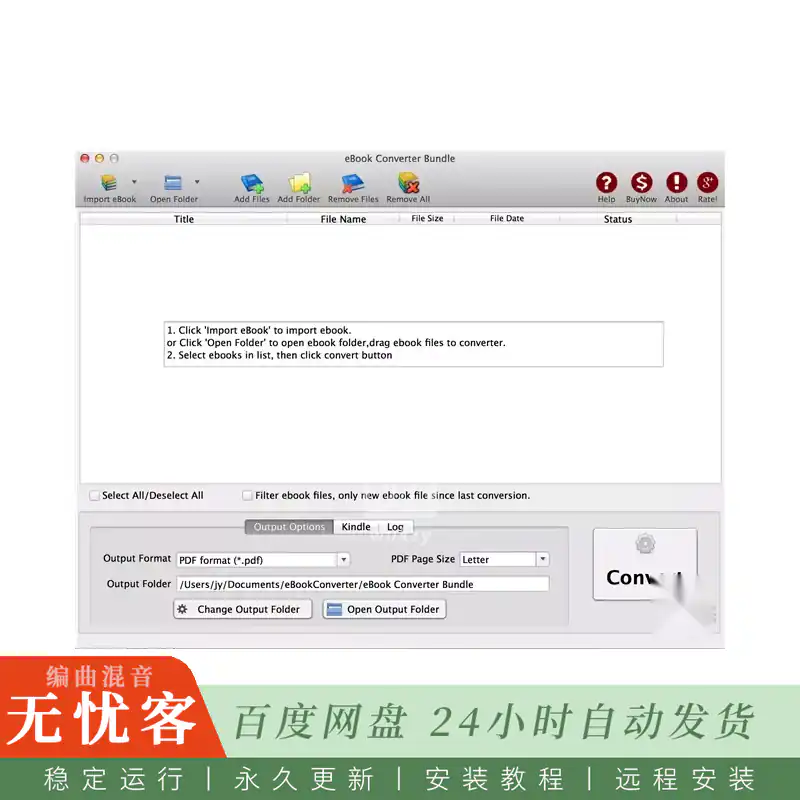
已发布的攻略描述了一个简单的队列。在Kindle库、Adobe Digital Editions库、NOOK标题、整个文件夹或单个文件中,顶部的控件将被拉出。中间列出了将要处理的内容。在底部,您可以设置输出格式和目标文件夹,然后开始转换任务。已完成的转换结果是一个新文件,您可以在“图书”、“Kindle”或“Pages”中打开。自动导入是节省大型图书馆时间的部分: Mac产品页面表示,该应用程序可以读取Kindle,Adobe Digital Editions和Sony的库,所以你不是在手工寻找每一个标题。如果文件从未出现,则商店应用程序通常尚未下载它,或者该文件使用了此构建不理解的保护方案。
简介:
eBook Converter Bundle 3.25.10120 (300) macOS [U2B]
macOS [U2B] | Multilingual | Size: 18.4 MB
eBook Converter Bundle is a utility that removes DRM protection from legally purchased eBooks and converts them into usable formats. It combines two functions in one app: protection removal and subsequent conversion.
The app allows you to “free” purchased books from being tied to a specific store or device. You add a file, the app removes protection, and prompts you to select the target format—all in one click.
Drop a folder of Kindle, EPUB, and PDF books onto a queue and write them out as files Apple Books, a Kindle, or a word processor can open.
Formats the queue actually accepts
The vendor at ebook-converter.com sells this as one converter for several store libraries rather than a separate app per shop. Documented inputs include titles already downloaded for Kindle, Adobe Digital Editions, Google Play, Sony, Kobo (including kepub), Barnes and Noble NOOK, and public-library EPUB or PDF files that arrive as ACSM loans. Output choices on the product page are PDF, EPUB, Kindle, Word, HTML, and text. That spread covers Apple Books, a Kindle device, a word processor, and a browser preview from the same queue.
The product page also states that store encryption and format conversion are handled in one job. You point the app at files already on disk, pick a format, and it writes a new file. The vendor does not promise that a fixed-layout PDF, a comic, or a scanned page will reflow into clean EPUB, and optical character recognition is not listed.
Import list, output folder, convert
Published walkthroughs describe a simple queue. Controls along the top pull in a Kindle library, an Adobe Digital Editions library, NOOK titles, a whole folder, or single files. The middle lists what will be processed. The bottom is where you set the output format and the destination folder, then start the job. A finished run is a new file you can open in Books, Kindle, or Pages. Automatic import is the part that saves time on a large library: the Mac product page says the app can read libraries from Kindle, Adobe Digital Editions, and Sony, so you are not hunting for every title by hand. If a file never appears, the store app usually has not downloaded it yet, or the file uses a protection scheme this build does not understand.




评论0