
简介:
Xilentch XMLimiter 2 v2.0.0已破解版含注册机-摩卡
摩卡 | VST3/AAX | 22.3 MB
XMLimiter 2——全球最透明、音量最大的母带限制器
XMLimiter 2并非传统的前视限制器。它不依赖于诸如起音或释放等时间常数参数。
相反,XMLimiter 2会像侦探一样,在每一刻都监控并读取您的整个信号。
这种原子级别的跟踪使我们能够实现最重要的一件事: 没有动态抑制感,没有立体声变窄,没有瞬态涂抹,没有泵浦…只是透明限制。
话虽如此,我们应当明确:根据素材的不同,某些反应是不可避免的。例如,某些独奏乐器(如钢琴)可能会有不同的响应。您的一些808或低音贝斯乐器可能表现得非常出色,而另一些则可能出现失真。这完全取决于材料。
但是,我们从在测试阶段支持我们的音频工程师那里收到的反馈帮助我们意识到一些重要的事情: 如果您将XMLimiter 2作为主输出的最终限幅器,并且在某些点听到失真,同时推动到您想要的水平,那么在你的混合阶段可能会有问题。
在这种情况下,我们建议在XMLimiter 2前插入一个均衡器,并进行必要的频率均衡调整。或者随心所欲地使用它——选择权在你手中。
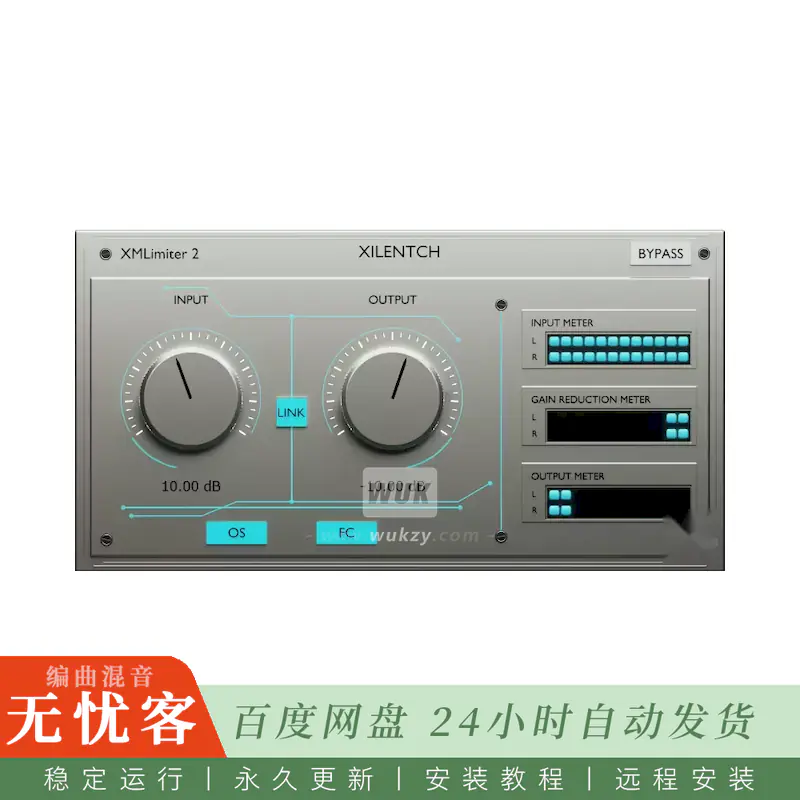
操作系统按钮
默认情况下,已启用x16过采样。这种出色的过滤器类型是我们最新的技术之一。我们建议在母带处理期间保持该功能开启。对于单个轨道,可以保持禁用状态。
在这一阶段,ISP(样本间峰值)保护功能保持开启。然而,dBTP则另当别论。我们不愿以“真峰值”为名,牺牲信号的透明度或增加额外的处理负担。
FC按钮
FC代表最终天花板阶段。如果您未启用串行限制,我们建议始终将其保持启用状态。否则,峰值点可能会被遗漏。
如果您使用的是串行限制,请禁用它,并让XMLimiter 2在中间信号链中完成其工作。
但我们也应当指出,FC阶段是独一无二的。我们专门为XMLimiter 2开发了它。它旨在捕捉过冲现象。
链接按钮
LINK按钮位于两个旋钮之间。启用后,LINK功能可让您同时以相反方向调节输入和输出旋钮,从而帮助您保持整体电平的平衡。
简介:
Xilentch XMLimiter 2 v2.0.0 Patched Incl. Keygen-MOCHA
MOCHA | VST3/AAX | 22.3 MB
XMLimiter 2 – The World’s Most Transparent and Loudest Mastering Peak Limiter
XMLimiter 2 is not a classic look-ahead limiter. It does not rely on time-constant parameters such as Attack or Release.
Instead, XMLimiter 2 watches and reads your entire signal like a detective — at every single moment.
This atomic-level tracking allowed us to achieve one thing above all else: no sense of dynamic suppression, no stereo narrowing, no transient smearing, no pumping… Just transparent limiting.
That said, we should be clear: depending on the source material, some reaction is unavoidable. For example, certain solo instruments such as piano may respond differently. Some of your 808s or sub-bass instruments may work perfectly, while others may distort. This depends entirely on the material.
However, the feedback we received from the audio engineers who supported us during the beta phase helped us realize something important: if you place XMLimiter 2 as the final limiter on your master output and you hear distortion at certain points while pushing to your desired level, then there is likely a problem in your mixing stage.
In that case, we recommend placing an EQ right before XMLimiter 2 and applying the necessary balancing. Or use it however you want — the choice is yours.
OS Button
By default, x16 oversampling is enabled. This outstanding filter type is one of our latest technologies. We recommend keeping it enabled during mastering. For individual tracks, it can remain disabled.
At this stage, ISP — Inter-Sample Peak — protection is maintained. However, dBTP is a different matter. We did not want to compromise signal transparency or add extra processing load in the name of “True Peak.”
FC Button
FC stands for the Final Ceiling stage. If you are not using serial limiting, we recommend keeping it enabled at all times. Otherwise, peak points may escape.
If you are using serial limiting, disable it and let XMLimiter 2 do its job within the intermediate signal chain.
But we should also point out that the FC stage is unique. We developed it specifically for XMLimiter 2. It is designed to catch overshoots.
LINK Button
The LINK button is located between the two knobs. When enabled, LINK allows you to adjust the Input and Output knobs in opposite directions at the same time, helping you maintain a balanced overall level.






评论0