
简介:
MindGems音频去重专业版v6.3.0.2含注册机-RLTS
RLTS团队 | 2026年10月19日 | 8 MB
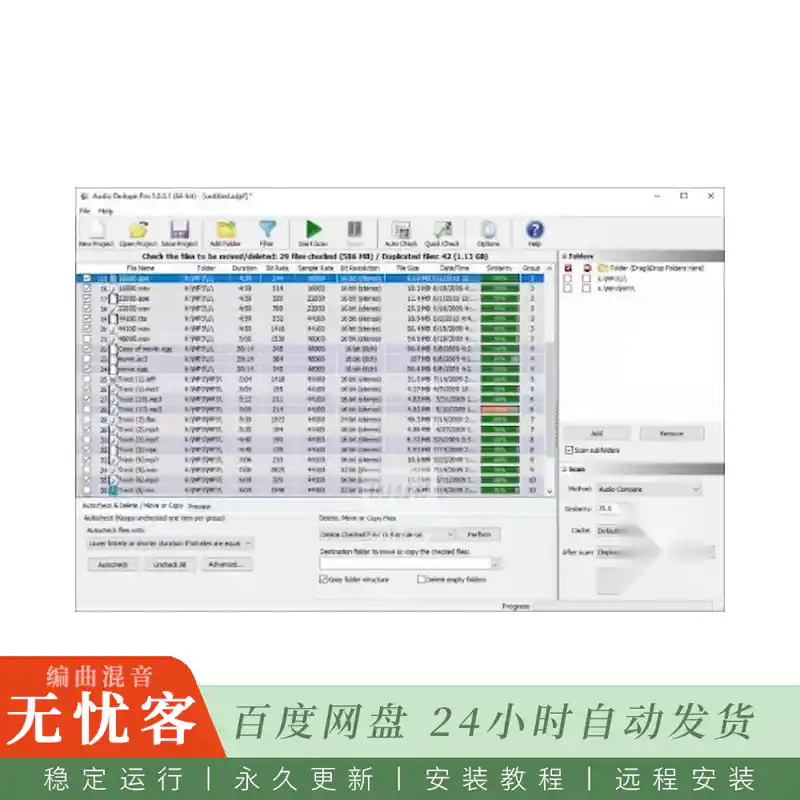
使用Audio Dedupe查找并删除重复的歌曲及相似的音乐文件。即使重复的音轨存储在不同的文件格式中且未标记ID3标签,也能将其定位。与其他MP3重复文件查找工具不同,它会“聆听”音乐,并能识别以不同文件格式保存的同一首歌曲。将相似度级别设置为100% 以查找完全匹配项,或将其降低以查找同一首歌曲的变体和混音。
音频去重功能简化了删除重复歌曲的流程。它会根据相似度对重复曲目进行分类,并通过内置的音频播放器提供便捷的预览功能。此工具可让您轻松标记、删除或自动移动相似歌曲,确保保留音质最高的音轨。
该应用经过高度优化,是唯一一款能够高效管理数百万音乐文件的重复音乐查找工具。此外,它还维护着一个已分析歌曲的缓存,从而确保后续搜索的极速响应。向音乐库添加新歌曲时无需再等待,而且请放心,它还能防止重复导入。
除了识别类似的歌曲,我们的重复歌曲finder提供了总共六种搜索模式,包括快速选项,用于精确定位重复和搜索ID3艺术家,标题或专辑中的相似之处。它还支持文件夹比较功能,用于查找重复的歌曲。查找重复的MP3,MP2,MP1,MPA,WAV,OGG,AIFF,AAC,MP4,FLAC,AC3,WV,MPC和WMA文件毫不费力地与我们先进的重复歌曲查找器。这款工具历经二十年的打磨,已成为整理歌曲的终极应用,囊括了您整理音乐库所需的所有功能。
•音频去重是一款功能强大的MP3重复文件查找工具,可用于删除文件夹及其子文件夹中相似的歌曲或完全相同的音频文件。它具有以下特点
•查找相似或重复的歌曲——基于真正的音频分析,比较实际的音频内容,而不仅仅是标签。指定音频相似度的百分比。
•查找相似或重复的ID3标签——搜索标题、专辑和艺术家相同的条目。
• 查找精确的重复音乐文件-快速二进制搜索克隆的曲目。
•真正的音频分析——我们的重复歌曲查找工具不依赖文件属性,而是直接比较实际的音频内容。
•自动保留音质最佳的歌曲——标记比特率较低的音频文件、时长较短的歌曲、文件体积较小的歌曲,或创建日期较早的歌曲。
• 集成的音频播放器预览音频重复-连续播放,同时在文件之间切换,让您轻松比较音频质量。
•支持手动选择重复音频文件——可手动标记文件,或修改系统自动筛选出的重复项。
•删除重复歌曲——移至回收站、自定义文件夹,或永久删除。
• 复制或编辑音频标签-轻松地将ID3标签从一首歌曲复制到另一首歌曲,或对其进行编辑以纠正错误或添加更多详细信息。
•筛选重复项-根据多种属性在搜索中排除或包含文件或文件夹。
• 多线程重复扫描-该工具同时比较多个文件,以比其他应用程序更快地找到重复的音乐。
•去重数百万首歌曲——移除重复音乐的范围仅受限于您的系统资源。
•上市20年——这是最可靠的重复歌曲删除工具,并且仍在积极开发中。
•直观的用户界面、丰富的文档,原生支持64位和32位Windows操作系统
简介:
MindGems Audio Dedupe Professional v6.3.0.2 Incl Keygen-RLTS
Team RLTS | 19 October 2026 | 8 MB
Find and remove duplicate songs and similar music files with Audio Dedupe. Locate repeating tracks even if they are stored in different file formats and are not marked with ID3 tags. Unlike other duplicate mp3 finders it will “listen” to the music and can recognize a song saved in different file formats. Set the similarity level to 100% to find exact matches or lower it to find variations and remixes of the same song.
Audio Dedupe streamlines the process of removing duplicated songs. It categorizes identical tracks based on similarity, offering a convenient preview through its integrated audio player. This tool enables you to effortlessly mark, delete, or automatically move similar songs, ensuring that you retain tracks with the highest audio quality.
The app is highly optimized, standing out as the sole duplicate music finder capable of efficiently managing millions of music files. Moreover, it maintains a cache of previously analyzed songs, ensuring lightning-fast subsequent searches. No more waiting when adding new songs to your music library, and rest assured, it prevents the importation of duplicates.
Beyond identifying similar songs, our duplicate song finder offers a total of six search modes, including swift options for pinpointing exact duplicates and searching for similarities in ID3 Artist, Title, or Album. It also facilitates folder comparisons for duplicate songs. Find duplicate MP3, MP2, MP1, MPA, WAV, OGG, AIFF, AAC, MP4, FLAC, AC3, WV, MPC, and WMA files effortlessly with our advanced duplicate song finder. Developed over two decades, this tool stands as the ultimate app for organizing songs, encompassing every feature you need to tidy up your music library.
•Audio Dedupe is a powerful duplicate mp3 finder for removing similar songs or exact duplicate audio files in a folder and its subfolders. It has the following features
•Find similar or duplicate songs – true audio analysis that compares the actual audio content and not just tags. Specify audio similarity in percentage.
•Find similar or duplicate ID3 tags – search alike Titles, Albums, and Artist.
•Find exact duplicate music files – fast binary search for cloned tracks.
•True audio analysis – our duplicate song finder does not rely on file properties – it compares the actual audio content.
•Preserve the songs with the best quality automatically – mark lower bit rate audio files, songs with shorter lengths, smaller file sizes, or older file dates.
•Integrated audio player to preview the audio duplicates – continuous playback while switching between files lets you easily compare the audio quality.
•Option to manually select the duplicate audio files – mark files manually or alter the automatically selected clones.
•Remove duplicate songs – move to Recycle Bin, custom folder, or delete permanently.
•Copy or edit audio TAGS – easily copy ID3 tags from one song to another or edit them to correct errors or add more details.
•Filter duplicates – exclude or include files or folders in the search based on various properties.
•Multi-threaded duplicate scan – the tool compares multiple files simultaneously to find duplicate music faster than other apps.
•Deduplicate millions of songs – removing duplicate music is limited only by your system resources.
•20 years on the market – this is the most reliable duplicate song remover and is actively developed.
•Intuitive interface, rich documentation, native support for 64-bit and 32-bit Windows operating systems


(wuk).webp)


评论0