
简介:
通常的嫌疑人88EmuPlayer 2.2.25赢得Mac Linux [免费]
免费 | Win Mac Linux单机版 | 166 MB
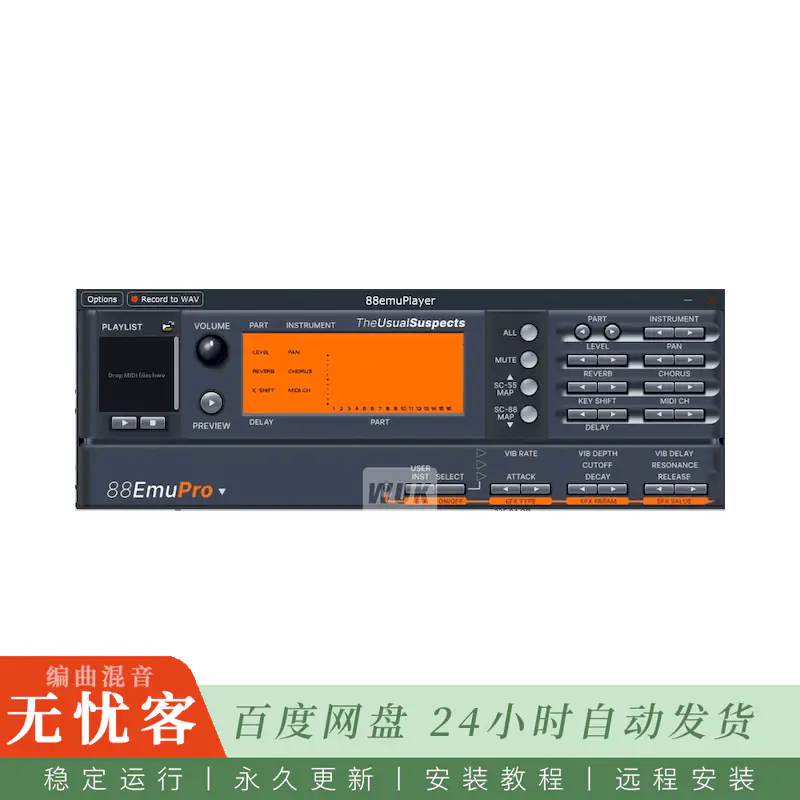
88Emu模拟大多数声音画布模块和相关早期声音发生器中的硬件,用于复古游戏和DTM。它在仿真cpu和声音芯片上运行原始固件,包括固件的乐器选择,语音分配,效果,MIDI处理和前面板行为。您提供ROM映像; 它们不包括在内。
88EmuPlayer不是一个DAW兼容的插件,而是一个独立的应用程序,用于播放MIDI文件,并使用这些设备从MIDI键盘,音序器或游戏。88EmuCli使用相同的仿真,使用命令行界面将文件离线渲染为WAV,而无需等待歌曲实时播放。
sage指南
您可以下载的压缩文件中包含两个可执行文件/应用程序:
88EmuPlayer: 如果您想使用该软件使用MIDI键盘播放,播放MIDI文件或使用它来玩复古视频游戏,请双击此软件;
88EmuCli: 如果您想快速将MIDI文件转换为WAV文件,而不必等待歌曲的时间实时通过。这是一个控制台应用程序,所以你可能想从你的终端运行它。
MacOS用户: macOS隔离了从internet下载的程序,并且可以拒绝首次打开88emuplayer或88emucli,称无法对其进行验证。打开系统设置 → 隐私和安全,向下滚动到安全,单击有关程序的消息旁边的打开,然后确认。这是每个程序需要一次; 对于88emucli,首先在终端中运行一次,以便消息出现。在macOS 14及更低版本上,按住Control键点按Finder中的app并选取 “打开” 也可以。
运行应用程序后,您可以选择要模拟的设备,例如SC-88或SC55mkII。单击设备后,将出现一个对话框,帮助您将必要的ROM文件正确安装到模拟器中。
然后,您可以在 “设置” 中配置MIDI输入和音频输出,打开/拖动要播放的MIDI文件到MIDI播放器区域,与硬件按钮进行交互以配置单元。
复古游戏的用法
您可以使用88EmuPlayer播放使用一般MIDI或GS音乐的较旧游戏。对MT-32和CM-64兼容游戏的实验支持仍然是部分的 (仅暂时CM-32P)。
为此,您需要将游戏或模拟器 (例如DOSBox,ScummVM或Neko项目) 的MIDI输出路由到88EmuPlayer。如果您使用的是MacOS或Linux系统,则可以选择创建 “虚拟MIDI端口”,因此,88EmuPlayer已经可以在模拟器的MIDI配置中显示为可用选项。但是,如果您使用的是基于Windows的系统,则需要使用第三方软件,例如LoopBe1或loopmidi。
包括rom:
(SC55mkII、SC88、SC88VL、SC88Pro和SC8850),来自Articstorm post:
https://Wukzy.com 下载/软件/300831-download_roland-sound-canvas-pack-sc55mkii-sc88-sc88vl-sc88pro-and-sc8850.html
简介:
The Usual Suspects 88EmuPlayer 2.2.25 WiN Mac Linux [FREE]
FREE | Win Mac Linux Standalone | 166 MB
88Emu emulates the hardware inside most Sound Canvas modules and related earlier sound generators, used for retro gaming and DTM. It runs the original firmware on emulated CPUs and sound chips, including the firmware’s instrument selection, voice allocation, effects, MIDI handling and front-panel behavior. You supply the ROM images; they are not included.
88EmuPlayer is NOT a DAW-compatible plugin, but instead a standalone application for playing MIDI files and using those devices from a MIDI keyboard, sequencer or game. 88EmuCli uses the same emulation to render files to WAV offline using a command line interface, without having to wait for the song to play in real time.
sage Guide
The zip files you can download contains two executable files/apps:
88EmuPlayer: Double click on this one if you want to use the software to play with a MIDI keyboard, playback MIDI files or use it to play retro video games;
88EmuCli: if you want to quickly convert MIDI files into WAV files, without having to wait for the time of the song to pass in real time. This is a console application, so you probably want to run it from your terminal.
MacOS users: macOS quarantines programs downloaded from the internet and can refuse to open 88EmuPlayer or 88EmuCli the first time, saying it could not verify them. Open System Settings → Privacy & Security, scroll down to Security, click Open Anyway next to the message about the program, and confirm. This is needed once per program; for 88EmuCli, run it once in Terminal first so that the message appears. On macOS 14 and earlier, Control-clicking the app in Finder and choosing Open also works.
Once you run the application, you can select with device you want to emulate, like the SC-88 or the SC55mkII. Once you click on the device, a dialog will appear helping you correctly installing the necessary ROM files into the emulator.
You can then configure your MIDI inputs and audio outputs in Settings, open/drag MIDI files to be played into the MIDI player area, interact with the hardware buttons to configure the unit.
Usage for Retro-Gaming
You can use 88EmuPlayer for playing older games that use General MIDI or GS music. Experimental support for MT-32 and CM-64 compatible games is still partial (CM-32P only for now).
To achieve this you will need to route the MIDI output of your game or emulator (such as DOSBox, ScummVM or Neko Project) into 88EmuPlayer. If you are in a MacOS or Linux system, an option is available to create a “Virtual MIDI port”, so that 88EmuPlayer can already show up as available option in the MIDI configuration of your emulator. If you are in a Windows based system, though, you will need to use a 3rd party software for that, such as LoopBe1 or loopmidi.
Included Roms:
(SC55mkII, SC88, SC88VL, SC88Pro and SC8850) from Articstorm post:
https://Wukzy.com.download/software/300831-download_roland-sound-canvas-pack-sc55mkii-sc88-sc88vl-sc88pro-and-sc8850.html

评论0