
简介:
Vovsoft合并音频文件v1.4含注册机-CORE
F4CG | 2026年11月5日 | 16 MB
Vovsoft合并音频文件
是一款简单高效的Windows应用程序,可帮助您将多个音频轨道合并为一个文件。无论您是想合并歌曲、有声书章节、播客、录音还是音乐合集,该程序都能为您提供一种简便的方法,将它们制作成一个连续的音频文件。
该软件支持多种主流音频格式,包括MP3、WAV、M4A、WMA、FLAC、OGG、OPUS、AAC、AIFF、AC3、EAC3、MP2和WV。只需添加文件或整个文件夹,按所需顺序排列,选择输出格式,然后保存合并后的结果。
这个轻量级实用工具可以
合并音频文件
从不同格式合并为一个文件。它也可以
合并音频文件
不需要复杂的音频编辑软件。对于寻求快速便捷的用户
音频文件合并器
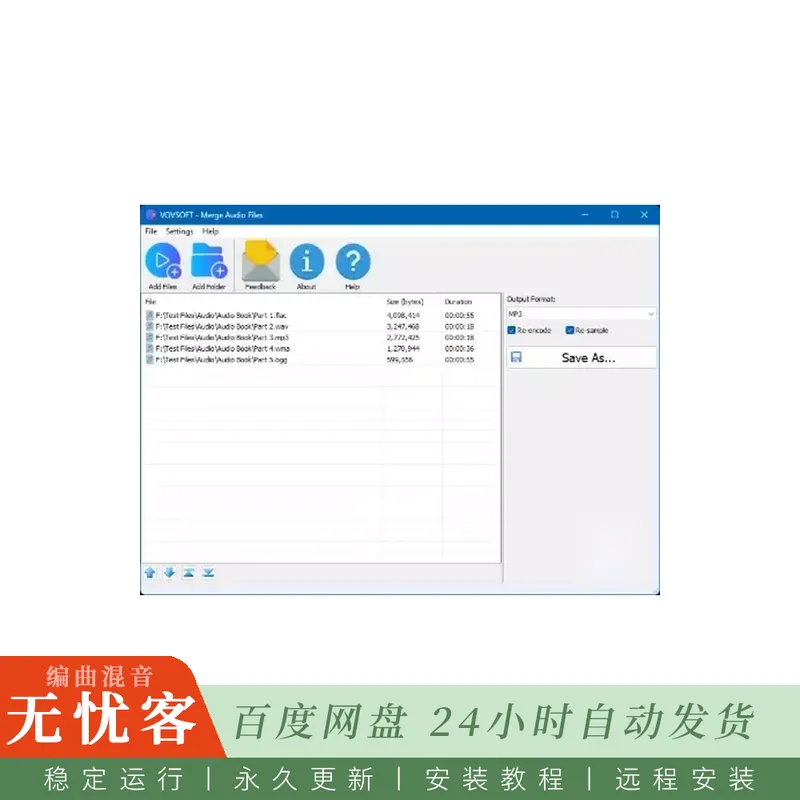
该应用程序界面简洁,工作流程顺畅便捷。
可以使用以下方式添加文件
添加文件
和
添加文件夹
按钮或仅通过
从Windows资源管理器拖放文件
进入文件列表。您还可以通过拖放轻松更改文件顺序,从而将音轨按最终合并文件中应有的顺序进行排列。
当所有输入文件采用相同的格式和音频设置时,合并可以快速完成。但是,当组合不同的格式 (例如,MP3、FLAC、WAV和WMA文件) 时,启用
重新编码
建议使用此选项,以确保最大程度的兼容性并生成流畅的输出文件。
主要特点
•将多个音频文件合并为一个音轨
•支持多种音频格式
• 添加单个文件或整个文件夹
•️ 从Windows资源管理器中拖放文件
•️ 通过拖放重新排序文件
•在混合不同格式时,重新编码音频以提高兼容性
• 将文件转换并合并为不同的输出格式
•简洁友好的用户界面
• 理想的有声读物,播客,讲座和音乐收藏
•轻量级且快速的Windows应用程序
无需任何高级音频编辑知识——只需选择文件、按所需顺序排列、选择输出格式,即可通过几次点击生成一个单独的音频文件。
类别:
音频与多媒体音频编解码器
支持:
Windows 11、Windows 10、Windows 8/8.1、Windows 7、Windows Vista(32位和64位)
简介:
Vovsoft Merge Audio Files v1.4 Incl.Keymaker-CORE
F4CG | 05 November 2026 | 16 MB
Vovsoft Merge Audio Files
is a simple and efficient Windows application that helps you merge multiple audio tracks into a single file. Whether you want to combine songs, audiobook chapters, podcasts, recordings, or music collections, the program provides a straightforward way to create one continuous audio file.
The software supports a wide range of popular audio formats, including MP3, WAV, M4A, WMA, FLAC, OGG, OPUS, AAC, AIFF, AC3, EAC3, MP2, and WV. Simply add files or entire folders, arrange them in the desired order, choose an output format, and save the merged result.
This lightweight utility can
combine audio files
from different formats into one file. It can also
join audio files
without requiring complicated audio editing software. For users looking for a fast and easy
audio file merger
, the application offers a clean interface and a hassle-free workflow.
Files can be added using the
Add Files
and
Add Folder
buttons or by simply
dragging and dropping files from Windows Explorer
into the file list. The file order can also be easily changed with drag-and-drop, allowing you to arrange tracks exactly as they should appear in the final merged file.
When all input files use the same format and audio settings, merging can be performed quickly. However, when combining different formats (for example, MP3, FLAC, WAV, and WMA files together), enabling the
Re-encode
option is recommended to ensure maximum compatibility and a smooth output file.
Key Features
•Merge multiple audio files into a single track
•Support for numerous audio formats
•Add individual files or entire folders
•️ Drag and drop files from Windows Explorer
•️ Reorder files with drag-and-drop
•Re-encode audio for better compatibility when mixing different formats
•Convert and merge files into a different output format
•Simple and user-friendly interface
•Ideal for audiobooks, podcasts, lectures, and music collections
•Lightweight and fast Windows application
No advanced audio editing knowledge is required—just select your files, arrange them in the desired order, choose an output format, and create a single audio file in a few clicks.
Category:
Audio & Multimedia Audio Encoders/Decoders
Supports:
Windows 11, Windows 10, Windows 8/8.1, Windows 7, Windows Vista (32-bit & 64-bit)







评论0