
简介:
Tugrulakyuz TugAutomat v1.0.1 WiN Mac Linux [免费]
免费 | Win Mac Linux VST3 AU | 72 MB
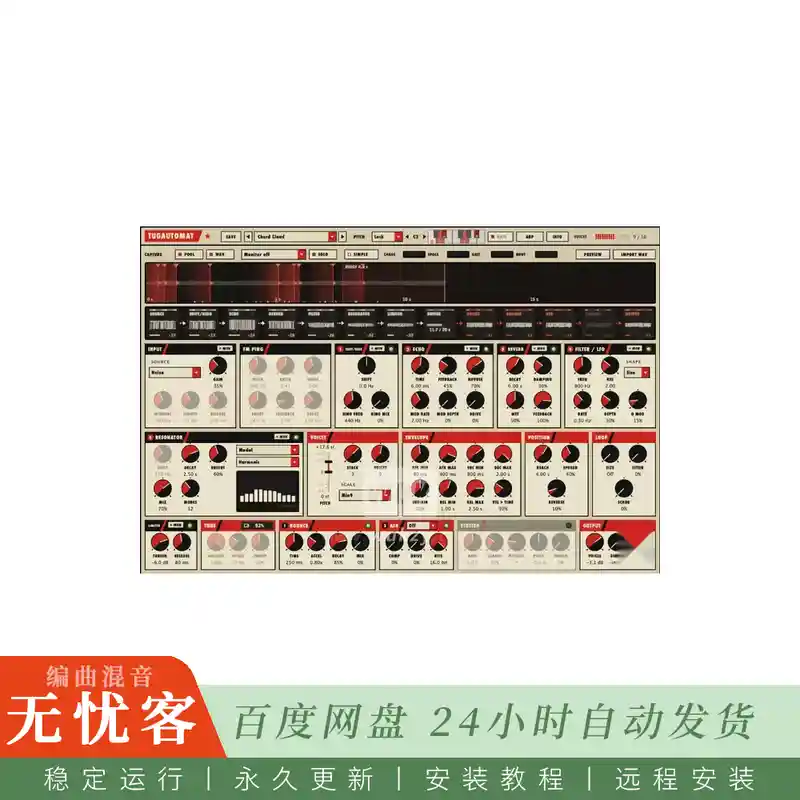
一台不断对自身进行采样的机器。一系列奇怪的声音源和反馈效果自行运行,并将其自身记录到20秒的循环中; 您的MIDI音符将声音发送到该录音中,以其他速度将其读回。音高和位置。
它为什么存在
我自己开始了TugAutomat。我想要一个可以自己制作奇怪材料的盒子,这样我就可以玩它刚刚做的事情,而不是从头开始设计每一个声音。
我喜欢同时听起来有点破碎和充满活力的音乐: 以不均匀的模式重复出现的小故障,金属在不应该的曲调中响起,从来没有以相同的方式两次出现的节奏。大多数工具都是可预测的。这个是为了给你惊喜,然后让你掌舵。
它慢慢地成长,一次一个实验,我分享它,因为几个朋友想尝试一下。这不是一个无所不能的合成器,也不是试图成为。
\
它的工作原理
TugAutomat有两半: 一个制作材料,另一个播放它。
生成链一直在运行。一个源 (噪声,点击,WAV文件,FM声,数学数字,奇怪的吸引子) 通过五个反馈块,您可以通过拖动重新排序,然后是一个限制器。你不会直接听到这部分: 它是原材料。
缓冲区将链记录到一个20秒的循环循环中,并用其调谐到的音调对其进行标记。
你听到的就是那些声音。每个MIDI音符开始一个 (最多16个)。一个声音跳入录音,以自己的速度和方向阅读,并带有自己的信封: 硬音符阅读刚刚录制的新鲜材料,软音符延伸到更远的地方。
输出总线为声音着色: 弹跳球延迟,ASR-10风格的lo-fi级 (29.76 kHz,更少的位) 和速度同步的口吃。
直接让你听到链本身,在播放模式下,你的钥匙像乐器一样播放链,而声音从它录制的内容中回答。
同样的事情,一层又一层
这些是插件内的信息窗口的页面,在播放时捕获: 块随着声音通过它们而发光,生成和播放页面按照您设置的顺序显示块。
生成: 源和提供记录的五个可重新排序的块。
里面有什么
来源
噪音,点击,你自己的WAV文件,调频声与谐波比率
作为声音播放的数学数字: 谐音,克利福德地图,Superformula,Spirograph,莫尔
流: 15个连续的奇怪吸引子 (Lorenz,r ö ssler,Aizawa,Thomas等),以音频速率解决
链条
移频器和环形调制器,短反馈回波,8线混响,具有吸引子驱动的LFO的带通
谐振器: 梳子,模态体 (铃铛,马林巴棒,金属齿,带有测得的部分的鼓膜),拨弦和封闭管,调至约一分钱以内
玩它
四种音高模式: 自由,钥匙 (按比例缩放并将音高的材料拉到音调中),锁定 (整个链条调到根),播放 (您的钥匙播放链条)
17音阶和和弦,来自一个八度音阶键盘的自定义音阶,每个音符的和弦堆叠
带有棘轮,概率和多向车道的arpeggiator: 速度,棘轮和机会可以在不同的长度上循环,因此模式会漂移
口吃: 刚刚播放的切片的节奏同步重复,音调下降并加快速度
四个宏 (混沌,空间,砂砾,身体) 和一个简单的视图,当你只是想玩
看到它
信号带显示每个块的范围和水平,声音沿着箭头流动
声音显示为刻录的楔子,其起点,循环窗口和到达窗口已标记
MON听链的任何一点; SOLO灰色了你没有听到的一切
INFO打开了七页实时图表,解释了每个图层,并通过声音通过它们绘制
三个面板主题: 建构主义海报外观 (默认),深色和浅色硬件
22个工厂预设,您自己的文件夹预设,可调整大小的窗口
适用人群(以及不适用人群)
如果你:
像毛刺,IDM,实验电子,声音设计和纹理,自己移动
比逐注地编程补丁更享受操纵进程的乐趣
想要一个奇怪的、有音调的或有节奏的材料来记录、重新取样和切割
如果你需要以下内容,这可能不适合你:
一个干净的,可预测的低音线和垫的合成,每次听起来都一样
一个预设的浏览器充满了完成,混合就绪的声音
你可以在五分钟内学会的东西,永远不要打开手册
那很好。它是为一小部分人打造的,我也是其中之一。
你的前十分钟
加载和弦云或敲钟并保持一些音符。声音需要MIDI; 没有播放,直到你做 (或打开arp与锁存)。
在 “输出” 面板中直接调高以听到链条现在正在录制的内容; 再次调低以仅听到声音。
按下“SIMPLE”键,并移动四个宏。在零,他们什么都不会改变,所以你总是可以回来。
加载毛刺滚动,在闩锁打开的情况下保持一个音符,并更改arp的通道长度: 模式开始漂移。
单击任何块上的MON以听到该点的链。
每当您丢失时,按信息: 图表显示每个图层的功能,实时显示,点击一个块会显示它在哪里。
完整的手册 (英语和土耳其语) 随附下载。
格式和要求
macOS AU、VST3
通用 (Apple Silicon和Intel),macOS 10.13或更高版本; 已签名并经过公证的安装程序
Windows VST3 64位
Linux VST3 64位
乐器插件,带MIDI输入,立体声输出; 版本1.0.1
CPU: 声音引擎在Apple M1上使用了一个内核的百分之几; 动画窗口的成本高于声音,并且可以通过关闭运动来使其平静
预设是您选择的文件夹中的纯XML文件,因此您可以共享它们
诚实的笔记
它是生成的: 相同的预设和相同的音符不会播放两次。记录你喜欢的东西。
这些声音需要MIDI。除非您直接出现,否则链会自己默默地记录。
它比预设更奖励耐心。预计要花一个晚上才能熟悉周边的路线。
这是一个单人项目。我修复了我能找到的东西; 如果你的主人有什么不端行为,告诉我,我会看看它。
简介:
Tugrulakyuz TugAutomat v1.0.1 WiN Mac Linux [FREE]
FREE | Win Mac Linux VST3 AU | 72 MB
A machine that keeps sampling itself. A chain of odd sound sources and feedback effects runs on its own and records itself into a 20-second loop; your MIDI notes send voices into that recording to read it back at other speeds, pitches and positions.
Why it exists
I started TugAutomat for myself. I wanted a box that keeps making strange material on its own, so I could play with what it just did instead of designing every sound from scratch.
I like music that sounds a little broken and alive at the same time: glitches that repeat in uneven patterns, metal that rings in tunes it shouldn’t, rhythms that never quite come round the same way twice. Most instruments are built to be predictable. This one is built to surprise you, and then let you steer.
It grew slowly, one experiment at a time, and I’m sharing it because a few friends wanted to try it. It is not a do-everything synth and it isn’t trying to be.
\
How it works
TugAutomat has two halves: one makes material, the other plays it back.
The generation chain runs all the time. A source (noise, clicks, a WAV file, FM pings, mathematical figures, strange attractors) passes through five feedback blocks you can reorder by dragging, then a limiter. You don’t hear this part directly: it is the raw material.
The buffer records the chain into a 20-second circular loop, and tags it with the pitch it was tuned to.
The voices are what you hear. Every MIDI note starts one (up to 16). A voice jumps into the recording, reads it at its own speed and direction, with its own envelope: hard notes read the fresh material just recorded, soft notes reach further back.
The output bus colours the voices: a bouncing-ball delay, an ASR-10 style lo-fi stage (29.76 kHz, fewer bits) and a tempo-synced stutter.
Direct lets you hear the chain itself, and in Play mode your keys play the chain like an instrument while the voices answer from what it recorded.
The same thing, layer by layer
These are the pages of the INFO window inside the plugin, captured while it plays: blocks glow with the sound passing them, and the generation and playback pages show the blocks in the order you set.
Generation: the source and the five reorderable blocks that feed the recording.
What’s inside
Sources
Noise, clicks, your own WAV file, FM pings with inharmonic ratios
Mathematical figures played as sound: Harmonograph, Clifford map, Superformula, Spirograph, Moiré
Flow: 15 continuous strange attractors (Lorenz, Rössler, Aizawa, Thomas and more), solved at audio rate
The chain
Frequency shifter and ring modulator, a short feedback echo, an 8-line reverb, a bandpass with an attractor-driven LFO
Resonators: comb, modal bodies (bell, marimba bar, metal tine, drum membrane with measured partials), a plucked string and a closed pipe, tuned to within about a cent
Playing it
Four pitch modes: Free, Key (snaps to a scale and pulls pitched material into tune), Lock (the whole chain tuned to a root), Play (your keys play the chain)
17 scales and chords, a custom scale from a one-octave keyboard, chord stacking per note
An arpeggiator with ratchets, probability and polymetric lanes: velocity, ratchet and chance can cycle over different lengths so the pattern drifts
Stutter: tempo-synced repeats of the slice just played, falling in pitch and speeding up
Four macros (Chaos, Space, Grit, Body) and a Simple view when you just want to play
Seeing it
The signal strip shows every block’s scope and level, with the sound flowing along the arrows
Voices appear as wedges riding the recording, with their start points, loop windows and the Reach window marked
MON listens to any point of the chain; SOLO greys out everything you are not hearing
INFO opens seven pages of live diagrams that explain each layer, drawn with the sound passing through them
Three panel themes: a constructivist poster look (default), dark and light hardware
22 factory presets, your own presets in folders, a resizable window
Who it’s for (and who it isn’t)
You’ll probably enjoy it if you:
like glitch, IDM, experimental electronics, sound design and textures that move by themselves
enjoy steering a process more than programming a patch note by note
want a source of strange, pitched or rhythmic material to record, resample and cut up
It is probably not for you if you need:
a clean, predictable synth for basslines and pads that sound the same every time
a preset browser full of finished, mix-ready sounds
something you can learn in five minutes and never open the manual for
That’s fine. It’s made for a small corner of people, me included.
Your first ten minutes
Load Chord Cloud or Struck Bells and hold a few notes. The voices need MIDI; nothing plays until you do (or turn on the arp with Latch).
Turn up Direct in the OUTPUT panel to hear what the chain is recording right now; turn it down again to hear only the voices.
Press SIMPLE and move the four macros. At zero they change nothing, so you can always get back.
Load Glitch Rolls, hold one note with Latch on and change the arp’s lane lengths: the pattern starts to drift.
Click MON on any block to hear the chain at that point.
Press INFO whenever you’re lost: the diagrams show what each layer does, live, and a click on a block shows you where it is.
A full manual (English and Turkish) comes with the download.
Formats and requirements
macOS AU, VST3
Universal (Apple Silicon and Intel), macOS 10.13 or later; signed and notarized installer
Windows VST3 64-bit
Linux VST3 64-bit
Instrument plugin with MIDI input, stereo output; version 1.0.1
CPU: the sound engine uses a few percent of one core on an Apple M1; the animated window costs more than the sound, and can be calmed with Motion off
Presets are plain XML files in a folder of your choice, so you can share them
Honest notes
It is generative: the same preset and the same notes will not play back identically twice. Record what you like.
The voices need MIDI. On its own the chain records silently unless you turn up Direct.
It rewards patience more than presets. Expect to spend an evening finding your way around.
It’s a one-person project. I fix what I can find; if something misbehaves in your host, tell me and I’ll look at it.


评论0