
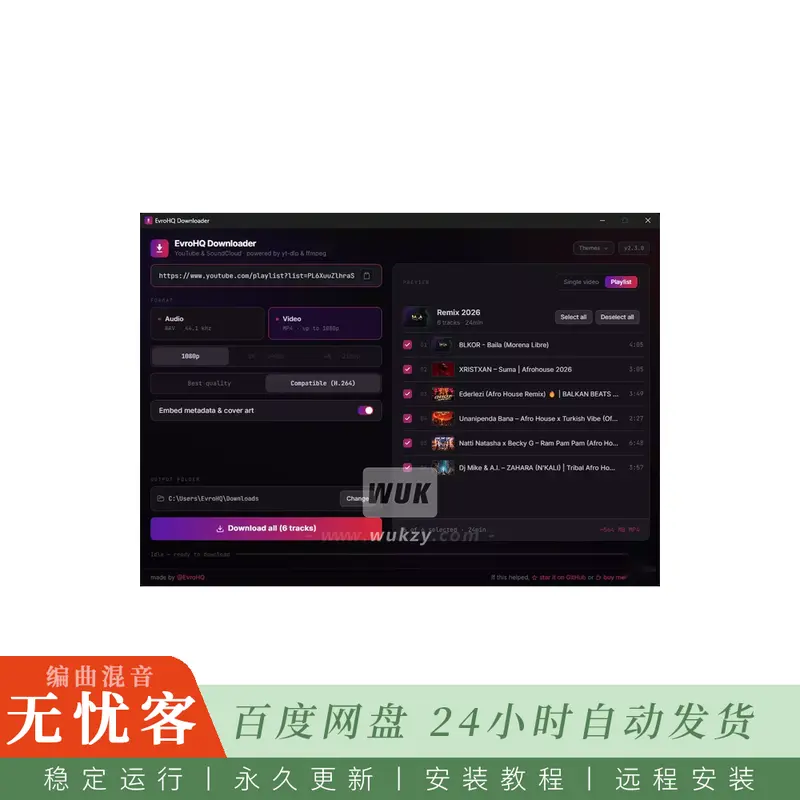
简介:
EvroHQ下载器v2.4.0 WiN FREE
WiN | x64 x86 | 251 MB
EvroHQ下载器
-从YouTube和SoundCloud下载音频,视频或播放列表,由yt-dlp和ffmpeg提供支持。
一个干净,现代的Windows应用程序,用于从YouTube和SoundCloud下载音频或视频-单个视频,曲目或整个播放列表。
功能
🎵音频-WAV (44.1 kHz,未压缩) 或MP3 (320 kbps)
🎬视频-MP4高达1080p/2k/4k (最佳可用,包括声音)
🎞️ 兼容 (H.264 AAC) -本机YouTube流,最大1080p,无需重新编码 (适用于在AV1上cho的编辑器和播放器)
📋播放列表-预览每首曲目,选择您想要的曲目,下载到以播放列表命名的文件夹中
🔗智能链接-时间戳 (& t =) 和额外的参数被剥离; 混音和音乐专辑保留播放列表
🖼️ 实时预览-下载前的缩略图,标题,频道,持续时间和估计的文件大小
✂️ Trim-仅下载特定时间范围 (单个视频)
📑按章节拆分-当视频包含章节时,将每个章节保存为自己的文件
🏷️ 嵌入元数据和封面艺术-将标签写入音频文件 (封面需要MP3)
🔄更新-应用程序和yt-dlp可以就地更新,以便YouTube下载保持正常工作
📦All-in-one-yt-dlp,ffmpeg和微型JS运行时捆绑在一起; 没有其他需要安装的东西
🎨主题-七种外观 (黑暗和光明); 下次记住您的选择
如何使用
扰流板:
单个视频
粘贴YouTube或SoundCloud链接 (或单击 “粘贴”)。右侧的预览会自动填充。
选择格式:
音频 → WAV (44.1 kHz,未压缩) 或MP3 (320 kbps)
视频 → 1080p、2k或4k (根据您的选择提供最佳质量; 视频始终包含声音)
(可选) 启用 “修剪特定范围” 以仅抓取一部分。
只需键入数字-字段格式本身: 键入001030变为00:10:30 (hh:mm:ss)。
(可选,音频) 保留 “嵌入元数据和封面”,以将标题,艺术家和封面写入文件。封面仅嵌入MP3。
选择带有更改的输出文件夹 (下次会记住)。默认是您的下载文件夹。
单击 “下载”。在状态行和栏中跟踪进度。
需要取消吗?单击 “停止”。
播放列表
粘贴播放列表链接。该应用程序切换到播放列表模式,并加载带有缩略图的曲目列表。
选择所需的轨道 (或使用 “全选”/“取消全选”)。
像往常一样选择音频或视频。Trim在播放列表模式下不可用。
单击 “下载”。文件落在以播放列表命名的子文件夹中。状态行显示下载2/12,所以你总是知道你在哪里。
当日志显示下载完成时,您的文件将显示在所选文件夹中。
简介:
EvroHQ Downloader v2.4.0 WiN FREE
WiN | x64 x86 | 251 MB
EvroHQ Downloader
– download audio, video or playlists from YouTube and SoundCloud, powered by yt-dlp and ffmpeg.
A clean, modern Windows app to download audio or video from YouTube and SoundCloud — single videos, tracks, or whole playlists.
Features
🎵 Audio — WAV (44.1 kHz, uncompressed) or MP3 (320 kbps)
🎬 Video — MP4 up to 1080p / 2K / 4K (best available, sound included)
🎞️ Compatible (H.264 + AAC) — native YouTube streams, 1080p max, no re-encode (works in editors and players that choke on AV1)
📋 Playlists — preview every track, pick the ones you want, download into a folder named after the playlist
🔗 Smart links — timestamps (&t=) and extra params are stripped; Mix and Music albums stay playlists
🖼️ Live preview — thumbnail, title, channel, duration and estimated file size before you download
✂️ Trim — download only a specific time range (single videos)
📑 Split by chapters — save each chapter as its own file when the video has chapters
🏷️ Embed metadata & cover art — write tags into audio files (cover art needs MP3)
🔄 Updates — the app and yt-dlp can update in-place so YouTube downloads keep working
📦 All-in-one — yt-dlp, ffmpeg and a tiny JS runtime are bundled; nothing else to install
🎨 Themes — seven looks (dark and light); your pick is remembered next time
How to use
Spoiler:
Single video
Paste a YouTube or SoundCloud link (or click Paste). The preview on the right fills in automatically.
Choose the format:
Audio → WAV (44.1 kHz, uncompressed) or MP3 (320 kbps)
Video → 1080p, 2K, or 4K (best quality available up to your choice; video always includes sound)
(Optional) Turn on Trim a specific range to grab only a portion.
Just type the digits — the field formats itself: typing 001030 becomes 00:10:30 (hh:mm:ss).
(Optional, audio) Leave Embed metadata & cover art on to write title, artist and cover into the file. Cover art is embedded for MP3 only.
Choose the output folder with Change (it’s remembered next time). Default is your Downloads folder.
Click DOWNLOAD. Follow progress in the status line and the bar.
Need to cancel? Click Stop.
Playlist
Paste a playlist link. The app switches to playlist mode and loads the track list with thumbnails.
Select the tracks you want (or use Select all / Deselect all).
Pick Audio or Video as usual. Trim is not available in playlist mode.
Click DOWNLOAD. Files land in a subfolder named after the playlist. The status line shows Downloading 2/12 so you always know where you are.
Your files appear in the chosen folder when the log says the download finished.






评论0