
简介:
Magenta Studio v2.0.0 AMXD [免费]
免费 | AMXD Ableton | 636 MB
洋红色工作室
是建立在Magenta的开源工具和模型上的Ableton Live插件。他们使用尖端的机器学习技术来生成音乐。
洋红色工作室
以前作为独立应用程序的集合提供。它们不会主动维护,但可能仍可在您的操作系统上运行。
概述
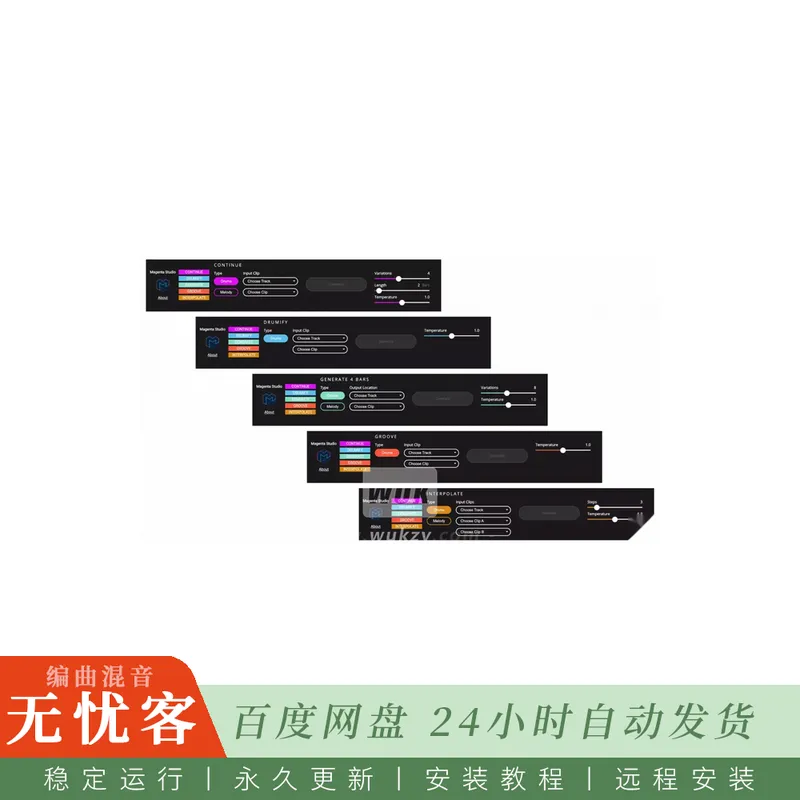
Magenta Studio是Ableton Live的MIDI插件。它包含5个工具: 继续,凹槽,生成,Drumify和插值,让你从会话视图应用MIDI剪辑的洋红色模型。
用法
启动插件
每个工具都可以通过点击插件中的名称来启动。
剪辑选择
所有的插件通过从Ableton的会话视图中选择一个或多个剪辑来工作。您必须先选择一个轨道,然后才能选择剪辑。只有MIDI轨道将显示为选项。完成所有选择后,“生成” 按钮将启用。
温度
所有的插件都有一个温度滑块。温度是用于在神经网络的最后一层中进行采样的参数。您可以将其视为控制随机性: 较高的值会产生更多的变化,有时甚至是混乱,而较低的值在预测中更为保守。
限制
旋律输入仅限于单声道旋律 (一次一个音符),鼓输入使用此MIDI映射。超出此范围的音符将映射到这9个乐器
版本2.0.0
-删除对Electron的依赖,而是在Max/MSP中的 [jweb] 对象中使用Chromium嵌入式框架 (CEF),该对象现在可在Max for Live中使用。
-在视觉上重新设计插件以适应实时界面。
-依赖关系更新和安全修复。
简介:
Magenta Studio v2.0.0 AMXD [FREE]
FREE | AMXD Ableton | 636 MB
Magenta Studio
is an Ableton Live plugin built on Magenta’s open source tools and models. They use cutting-edge machine learning techniques for music generation.
Magenta Studio
was formerly available as a collection of standalone applications. They are not actively maintained but may still work on your operating system.
Overview
Magenta Studio is a MIDI plugin for Ableton Live. It contains 5 tools: Continue, Groove, Generate, Drumify, and Interpolate, which let you apply Magenta models on your MIDI clips from the Session View.
Usage
Launching the plugin
Each of the tools can be launched by clicking on its name within the plugin.
Clip selection
All of the plugins work by choosing one or more clips from Ableton’s Session View. You must choose a track before selecting your clip. Only MIDI tracks will show up as options. Once all of your selections are made, the Generate button will become enabled.
Temperature
All of the plugins have a temperature slider. Temperature is a parameter used for sampling in the last layer of the neural network. You can think of it as controlling randomness: higher values produce more variation and sometimes even chaos, while lower values are more conservative in their predictions.
Limitations
Melody input is limited to monophonic melodies (one note at a time), and drums input uses this MIDI mapping. Notes outside this range will be mapped to these 9 instruments
v2.0.0
– Removes the dependency on Electron, instead utilizing Chromium Embedded Framework (CEF) in the [jweb] object in Max/MSP, which now works in Max for Live.
– Visually redesigns the plugin to fit within the Live interface.
– Dependency updates and security fixes.


评论0