
简介:
Tugrulakyuz TugMultiEffect v2.0 Windows Mac Linux [免费]
免费 | 赢取Mac Linux VST3 AU | 79 MB
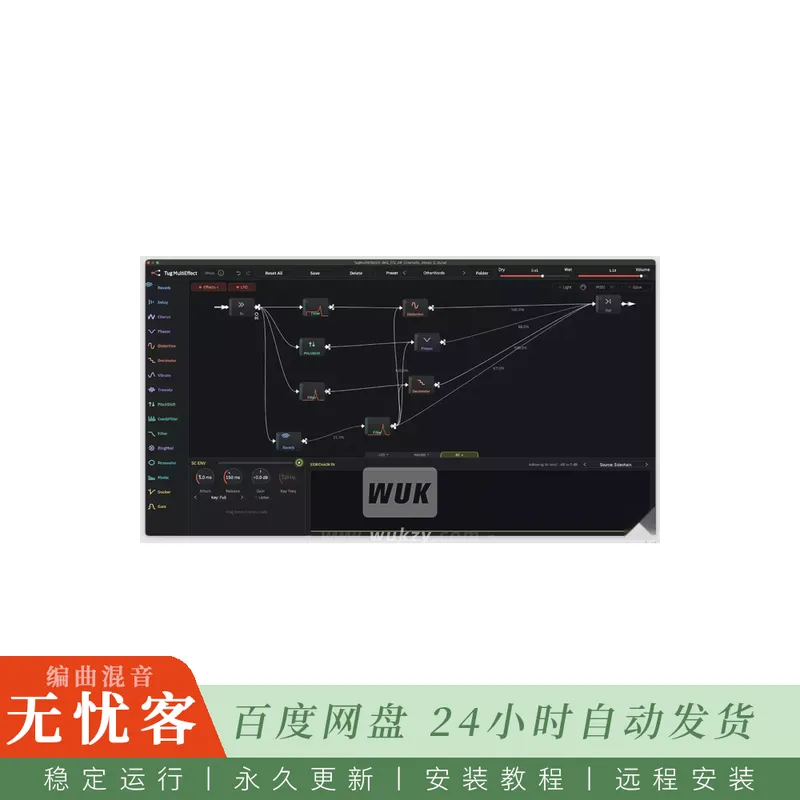
TugMultiEffect是一款多功能音频插件,旨在提升音频录音的音质。它提供了多种不同的效果,这些效果在插件的主窗口中以方框的形式呈现。这些效果包括延迟、合唱、混响、失真等多种处理工具。
有什么新内容。2.0
构建您自己的图表。将效果拖放到画布上,并按您的喜好进行连接:拆分信号、并联运行效果、再将其重新合并。
新增五种效果:环形调制、谐振器、模式合成器(可演奏和弦,最多4个声部)、衰减器和门限器。总共16种效果。
侧链。将底鼓信号路由至插件,并用它来触发滤波器的低切、门限或调制图形中的任何参数。达克和盖特有一个关键滤波器,倾听他们所听到的声音。
调制。4个低频振荡器——包括可随机变化的“Drift”以及用户自定义波形——4个宏旋钮,以及一个跟随侧链输入的包络。将源拖放到节点上,然后选择旋钮。
可自定义的线缆:每根线缆均配备电平、静音和极性切换开关,并支持左声道、右声道、中置或侧边信号的分配。
MIDI。谐振器、环形调制器和模态合成器会跟随您弹奏的音符。
撤销与重做、带有搜索和分类功能的预设浏览器,以及14个内置的新出厂预设。
全新外观,支持浅色与深色模式,并可在可调整大小的窗口中使用;内置指南:点击插件名称即可。
此外,还修复了一系列问题,其中包括:在插件窗口打开之前保持静音的项目、自动化运行时的崩溃,以及“延迟”旋钮完全不起作用的合唱效果器。
您的项目和预设
使用早期版本保存的项目和预设在打开时,其图表和设置将保持原样。
如何更新
1. 从您的Gumroad资料库下载TugMultiEffect 2.0。
2. 在旧版本的基础上进行安装[使用安装程序/复制插件文件——请说明具体操作]。
3. 重启您的数字音频工作站。有些数字音频工作站会在首次使用时重新扫描插件。
TugMultiEffect的一大亮点在于,它能够以多种方式对这些效果进行路由和连接。这意味着用户可以尝试不同的效果组合,创造出符合自身需求的独特音景。路由系统灵活易用,用户可以拖放连接线,在不同的效果器模块之间建立连接:
混响。
延迟。
合唱。
分频器。
失真。
相位器。
音高变换器。
梳状滤波器。
颤音。
颤音。
滤波器(穆格型/自谐振)。
带有许多参数。
简介:
Tugrulakyuz TugMultiEffect v2.0 WiN Mac Linux [FREE]
FREE | Win Mac Linux VST3 AU | 79 MB
TugMultiEffect is a versatile audio plugin designed to enhance the sound of audio recordings. it features many different effects, which are represented by boxes on the main window of the plugin. These effects include tools such as delay, chorus, reverb, distortion, and more.
WHAT’S NEW. 2.0
Build your own graph. Drag effects onto the canvas and wire them however you like: split the signal, run effects side by side, bring it back together.
Five new effects: Ring Mod, Resonator, Modal (plays chords, up to 4 voices), Ducker and Gate. 16 effects in all.
Sidechain. Route a kick into the plugin and duck, gate or modulate anything in the graph with it. The Ducker and the Gate have a key filter, and Listen to hear what they hear.
Modulation. 4 LFOs – including the wandering Drift and shapes you draw yourself – 4 macros, and an envelope that follows the sidechain. Drag a source onto a node and pick the knob.
Cables you can shape: a level, mute and polarity switch on every cable, and Left, Right, Mid or Side splits.
MIDI. The Resonator, Ring Mod and Modal follow the notes you play.
Undo and redo, a preset browser with search and categories, and 14 new factory presets built in.
A new look, light and dark, in a resizable window – and a built-in guide: click the plugin’s name.
And a long list of fixes, among them projects that stayed silent until the plugin window was opened, crashes under automation, and a Chorus whose Delay knob did nothing.
YOUR PROJECTS AND PRESETS
Projects and presets saved with earlier versions open with their graphs and settings as they were.
HOW TO UPDATE
1. Download TugMultiEffect 2.0 from your Gumroad Library.
2. Install it over the old version [installer / copy the plugin files – say which].
3. Restart your DAW. Some DAWs scan the plugin again the first time.
One of the standout features of TugMultiEffect is its ability to route and connect these effects in various ways. This means that users can experiment with different combinations of effects and create unique soundscapes that suit their needs. The routing system is flexible and easy to use, allowing users to drag and drop connections between the different effects boxes:
Reverb.
Delay.
Chorus.
Decimator.
Distortion.
Phaser.
Pitchshifter.
Combfilter.
Vibrato.
Tremolo.
Filtre (Moog type/ self resonance).
with many parameters.


评论0