
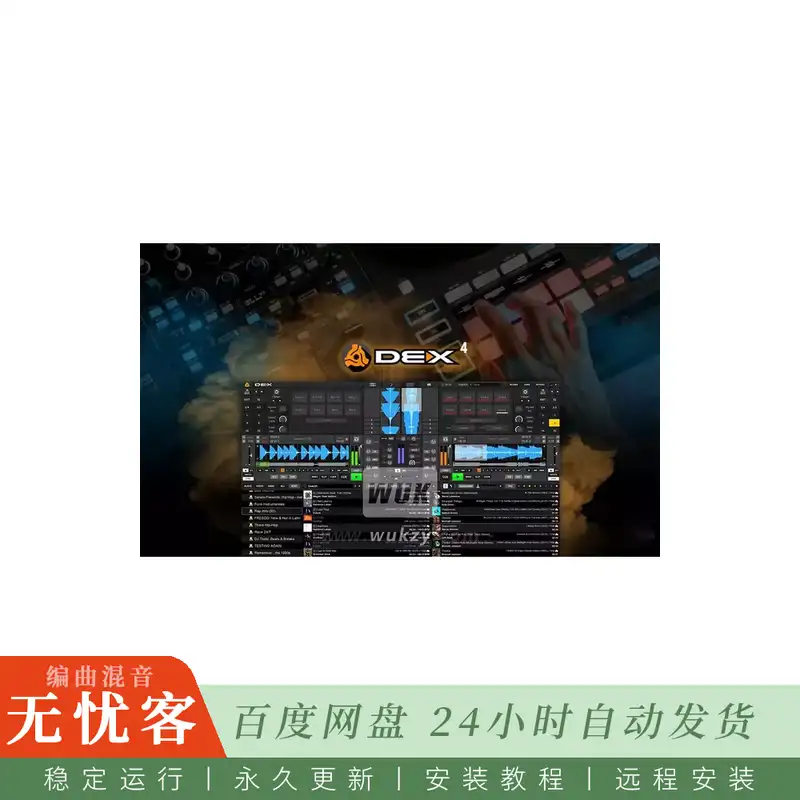
简介:
PCDJ DEX Pro x64 v4.1.0.0-F4CG
F4CG | 10.2026 | 458 MB
此外,引入具有多种模式的垫,如环卷,切片机和音高播放,为现场混音和表演提供了无限的可能性。对于那些寻求最终硬件集成的人来说,DEX 4现在完全支持RANE Four控制器,包括其11个显示器,确保您拥有所需的所有信息。
Elastique技术用于时间拉伸和音高转换,可实现更精确和高质量的声音操作。无论您是在探索新的滑动和量化模式以进行创新的节拍杂耍,还是使用完全手动控制来制作自己的循环,DEX 4都提供了将您的混音推向新高度所需的工具。
DEX 4功能亮点:
循环、热提示、刮擦、反转、暂停的滑动模式
• 循环-所有循环现在都充当循环卷
• 热提示点-这些充当瞬时提示点 (例如,仅在按下按钮/垫时)
• 划痕-划痕完成后,轨道将恢复,好像没有划痕
•反向-与刮擦相同
•暂停(带唱片机停止效果)
量化/快拍模式的线索,循环,通过轨道搜索
• 这会影响: 循环自动/手动模式 (捕捉节拍和大小量化),提示设置量化,寻找 (播放时) 量化
• 从兼容的控制器量化功能可以控制每个甲板或全局 (所有甲板)
• 全新的时间拉伸和音高转换 (由zplane的Elastique Pro提供)
• 环辊
• 切片器和循环切片器 (完全量化,包括卷)
•音高播放
• 标记: 提示点和循环现在统一 (合并) 到 “标记” (即两者)。基本上可以将它们视为书签或兴趣点。
• 标记可以有自定义颜色和名称 (右键单击以编辑它们)-这些也显示在compatbile控制器上 (例如,RANE四显示标记的颜色和名称/文本)
• 右键单击不再清除提示点 (标记); 您仍然可以使用专用的X (删除提示) 按钮或长按 (几秒钟; 在滑动模式下禁用)
• 具有8个垫模式选择的垫部分 (标记,循环滚动,切片器,切片器循环,采样器,节拍跳跃,音高播放,茎)
• 即时循环 (具有预选值)
• 完全手动循环-禁用量化并手动控制循环的开始和结束/大小 (设置入点和出点而不进行节拍或量化)
• 手动循环调整-当循环处于活动状态时,您可以使用兼容控制器的滚轮或用户界面调整其左/入点,右/出点或向左或向右移动
• 如果控制器没有专用的循环调整按钮,您可以在控制器上使用Shift提示点1,2,3-注意: 当不在循环内时,这将删除正在按下的提示点 (正常功能)
• Shift提示1启用左点 (循环进入) 编辑模式
• Shift提示2启用右点 (循环输出) 编辑模式
• Shift Cue 3启用位置 (移动) 编辑模式 (例如,左右点 (循环输入输出) 都移动,从而移动整个循环)
• 使用滚轮搜索/移动模式调整循环-按住Shift并将滚轮移动到所需的方向 (和所需的量)-当不在循环内时,这将 • 搜索/移动轨道本身 (正常功能)
• 虽然它比使用控制器麻烦得多,但在用户界面本身上,您也可以右键单击循环-/ (半/双循环) 按钮以启用编辑模式,然后右键单击 • 循环 (移动循环) 按钮以调整点
• 转盘缓慢启动/停止电机效果 (0.0-5.0秒)
• 模糊键匹配/键混合-它将以最小的键/音高移位实现键同步 (无,/-1或/-2半音最大)
• 这允许仅使用/- 1 (或max /- 2) 半音键移位进行键混合; 请参阅 https://www.digitaldjtips.com/fuzzy-keymixing-the-new-way-to-dj/
• 新控制器: RANE四
其他功能:
• 为展位 (输出) 和记录 (输入) 添加了新的音频路由选项
• 添加的软件发送/返回FX对外部混频器 (或带有硬件DSP混频器的控制器) 有用,允许软件处理的FX (外部硬件向我们发送信号以将FX应用于,• 我们处理它,然后我们将其发送回来)
• 我们不再将EQ应用于外部混音器模式 (因此我们不会使用双EQ)
• 循环或更改当前位置 (通过轨道搜索/搜索) 时的交叉淡入淡出-这听起来更流畅
• 增加了对的支持。webm视频文件
• 增加了防止屏幕和系统进入睡眠模式
• 默认情况下,同步按钮的始终处于同步选项 (“尽可能使用同步锁定”) 现在已禁用 (对于新安装)
• 删除制动功能 (使用转盘缓慢暂停/停止效果)
• 删除设置: “使用滑动模式循环” (现在使用真正的滑动模式)
• 修改设置: “时间拉伸质量” 现在更细粒度,您可以选择: 标准质量 (快),更好的质量,最好的质量 (慢)
• 新设置: “显示音频峰值负载而不是平均CPU负载”。您可以使用它来诊断音频中断/过载,例如由于以下情况而导致的故障,口吃,弹出声和咔嗒声 • 延迟设置过低,时间延长质量设置过高,或者只是性能不佳/速度较慢的计算机。
• 删除设置: “截止滤波器模式”-滤波器现在总是设置为低通和高通
• 需要重新采样时的WASAPI改进 (例如,音频卡设置为48000Hz,我们需要从44100Hz重新采样)
• 搜索/寻找通过轨道现在被量化为一个酒吧 (播放时)
• Beatsource/Beatport: 名称从 “离线储物柜” 更改为 “离线库”
• TIDAL: 离线模式
• 重新实施慢音调/速度重置,音调/速度弯曲
• 提高稳定性
简介:
PCDJ DEX Pro x64 v4.1.0.0-F4CG
F4CG | 10.2026 | 458 MB
Additionally, the introduction of PADs with versatile modes like Loop Rolls, Slicer, and Pitch Play offers endless possibilities for live remixing and performance. And for those seeking the ultimate in hardware integration, DEX 4 now fully supports the RANE Four controller, including its 11 displays, ensuring you have all the information you need right at your fingertips.
Elastique technology for time-stretching and pitch-shifting, allowing for more precise and high-quality sound manipulation. Whether you’re exploring the new SLIP and QUANTIZE modes for innovative beat juggling or crafting your own loops with fully manual controls, DEX 4 provides the tools you need to push your mix to new heights.
DEX 4 Feature Highlights:
SLIP mode for loops, hot cues, scratching, reverse, pause
•loops – all loops now act as loop rolls
•hot cue points – these act as momentary cue points (eg. only while the button/pad is being pressed)
•scratch – after scratching is complete the track will resume as if there was no scratch
•reverse – same as with scratch
•pause (with turntable stop effect)
QUANTIZE / Snap-to-beat mode for Cues, Loops, searching through the track
•this affects: loop auto/manual mode (snap-to-beat and size quantizing), cue set quantizing, seek (while playing) quantizing
•from compatible controllers the Quantize function can be controlled per deck or globally (all decks)
•brand-new time-stretching and pitch-shifting (courtesy of zplane’s Elastique Pro)
•Loop rolls
•Slicer and Loop Slicer (fully quantized, including rolls)
•Pitch Play
•Markers: cue points and loops are now unified (merged) into ‘markers’ (that do both). Think of them as bookmarks or points of interest basically.
•markers can have custom colors and names (right click to edit them) – these are also displayed on compatbile controllers (eg. the RANE FOUR shows both the color and the name/text of a marker)
•right click no longer clears cue points (markers); you can still do it using the dedicated X (delete cue) button or by a long-press (a couple of seconds; this is disabled when in SLIP mode)
•PADs section with 8 pads mode selection (Markers, Loop Roll, Slicer, Slicer Loop, Sampler, Beat Jump, Pitch Play, Stems)
•instant loops (with pre-selected value)
•fully manual loops – disable quantize and manually control the start and end/size of a loop (set the in and out points without snap-to-beat or quantize)
•manual loop adjustment – when a loop is active you can adjust its left/in point, right/out point or move it left or right using the jog-wheel of a compatible controller or the user interface
•If a controller doesn’t have dedicated loop adjustment buttons you can use Shift + Cue point 1,2,3 on a controller – NOTE: when NOT inside a loop this will delete the cue point being pressed (normal functionality)
•Shift + Cue 1 enables the left point (loop in) editing mode
•Shift + Cue 2 enables the right point (loop out) editing mode
•Shift + Cue 3 enables the position (moving) editing mode (eg. both left and right points (loop in + out) are moved thus moving the whole loop)
•Use jog-wheel search/move mode to adjust the loop – keep Shift pressed and move the jog-wheel to the direction needed (and the amount needed) – when NOT inside a loop this will •search/move through the track itself (normal functionality)
•While it is a lot more cumbersome than using a controller, on the user interface itself you can also right-click on the loop -/+ (half/double loop) buttons to enable editing mode and then right-click •on the loop (move loop) buttons to adjust the point
•turntable slow start/stop motor effect (0.0 – 5.0 seconds)
•fuzzy key matching / key mixing – it will achieve key sync with minimal key/pitch shifting (none, +/-1 or +/-2 semitones max)
•this allows key mixing with just a +/- 1 (or max +/- 2) semitones key shift; see https://www.digitaldjtips.com/fuzzy-keymixing-the-new-way-to-dj/
•new controller: RANE Four
Other features:
•added new Audio Routing options for Booth (output) and Record (input)
•added software send/return FX useful for external mixers (or controlleres with hardware DSP mixers) that allow for software processed FX (the external hardware sends us a signal to apply FX to, •we process it and then we send it back)
•we no longer apply EQ for external mixer mode (so we don’t double-EQ)
•cross-fading when looping or changing the current position (seek/search through the track) – this sounds a LOT smoother
•added support for .webm video files
•added prevent the screen and system to enter sleep mode
•always-in-sync option (“Use sync-lock when possible”) for SYNC button is now disabled by default (for new installs)
•removed brake feature (use turntable slow pause/stop effect instead)
•removed setting: “Use Slip mode for looping” (use true Slip mode now)
•modified setting: “Time-stretch quality” is now more granular and you choose between: Standard quality (fast), Better quality, Best quality (slow)
•new setting: “Show audio peak load instead of average CPU load”. You can use this in diagnosing audio disruptions/overloads such as glitches, stutters, pops and clicks resulting from an •excessively low latency setting, an overly high time-stretch quality setting, or simply an underperforming/slow computer.
•removed setting: “Cutoff Filter Mode” – the filter is now always set to LowPass & HighPass
•WASAPI improvements when resampling is needed (eg. the audio card is set at 48000 Hz and we need to resample from 44100 Hz)
•searching/seeking through the track is now quantized to one bar (when playing)
•Beatsource/Beatport: changed name from “Offline Locker” to “Offline Library”
•TIDAL: Offline Mode
•reimplemented slow pitch/tempo reset, pitch/tempo bend
•improved stability

评论0