
简介:
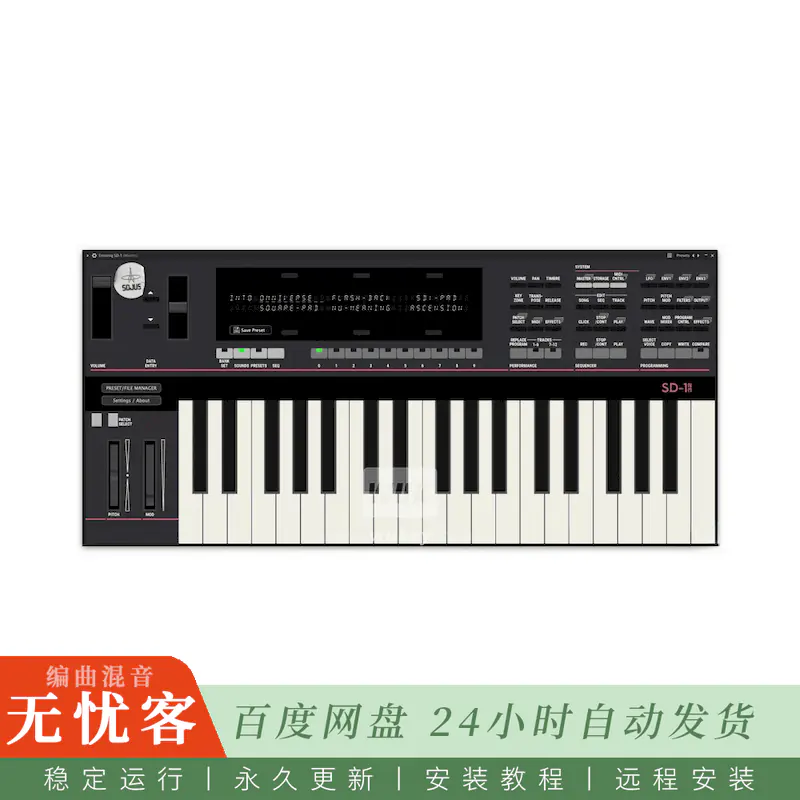
Sojus Records Ensoniq SD-1 v1.0.2 VST3 AU WiN MAC LiNUX [免费] ROM固件
免费 | WiN MAC LiNUX | 129 MB
模拟器®基于VST3/AU的周期级精确仿真
Ensoniq®SD-1
32-使用JUCE构建的语音合成器®
Ensoniq SD-1预设/文件管理器
我们是Sojus记录,运行时间最长的网络标签之一仍然活跃。我们是音乐家,不是程序员,但我们喜欢旧的合成器和仿真。我们决定构建一个功能齐全的VST3/AU版本的MAME模拟Ensoniq SD-1/32,这是以前从未被模拟过的。由于最近的AI编码革命,我们已经成功地构建了它。最后一个很好的使用vibe编码!这一概念验证对音乐家和程序员而言都是重要的一步。我们期待在未来让更多的MAME合成器焕发生机!
功能:
新: VST自动化通过面板。
您可以通过在面板中选择任意滑块或按钮来实现其自动化。(是的,即使使用Ableton Live。)自动化功能在面板上也可见。
新: 音序器可以使用DAW传输按钮进行控制,响应歌曲的位置,并同步BPM。
注意: 您必须启用外部MIDI控制: 停止/控制-» 时钟: MIDI。感谢迈克·芬布勒的测试!
-全功能预设和磁盘管理器。
-使用MIDI键盘浏览和播放任何预设:
-内部: RAM,ROM 0和1,附加墨盒
-任何外部文件夹: 支持的VFX,vfx-sd,SD1。SYX文件,盒式磁带文件,.HFE/.IMG磁盘映像。
-即时单程序,预设和全。SYX银行导入。
-导出单个程序和预设。SYX和。SYX银行从INT RAM,附加的墨盒,磁盘映像和墨盒文件。
-没有必要从现在开始切换sys-ex菜单,因为它总是在启动时启用。
-简化的ROM管理,便于安装。我们彻底改革了ROM文件的处理方式,使安装过程防弹和音乐家友好 :)
-音乐方法: 获取Ensoniq SD-1/32′ sd132′ 和Ensoniq LCD ‘2x40_vfx’ ROM文件。启动插件,它显示一个友好的警告屏幕与 “定位rom…” 按钮。它会打开一个多选文件浏览器,用户可以在其中进行选择。zip文件,松散。Bin文件或只是打开一个文件夹与插件处理提取和复制透明的文件。阅读ROM安装的更多信息!
重做MIDI自动化。这次真的 :) 每个面板按钮都可以自动化并分配给虚拟或物理MIDI控制器。
阅读FAQ了解更多信息!
-全功能MIDI输出
-删除实例阻塞你可以加载一个插件的许多实例,只要你想在你的DAW!感谢kbaccki调查单身人士。
-macOS AU首个公开版本。仅限选定的数字音频工作站!请注意,AU插件仅适用于Logic,GarageBand,MainStage,Ableton Live,Fender Studio Pro (Studio One) 和Reaper。任何其他数字音频工作站都必须使用VST3版本!在逻辑11,Fender Studio Pro 8,收割者7,Ableton Live 12上进行了测试。
-为没有MIDI控制器的用户预设保存宏按钮
-Windows 10 64位VST3 AVX1/AVX2,Mac英特尔ARM通用二进制VST3和AU,Linux VST3通用/AVX2
-全局设置保存,VST3/AU状态保存
-4种不同的面板布局,可调整大小的GUI和VFD显示
-缓冲区设置
-4个输出: 立体声main out,可选立体声aux (无效果的干信号)
-可以加载/保存所有兼容的VFX/VFX-SD/SD1-24/SD1-32 SYX文件,磁盘映像 (.img,.hfe,。磁盘,。eda) 和墨盒 (.eeprom,。rom,。手推车,.sc32)
阅读FAQ了解更多信息!
已知限制:
-没有软盘驱动器声音: D
⚠️ macOS用户
由于Apple的安全策略,Mac二进制文件需要以下方法之一才能运行:
所有在Tahoe之前的macOS版本:
–
手动授权
-用户必须转到系统设置> 隐私和安全,并在DAW尝试加载插件后,单击 “无论如何打开” 按钮。
–
更好的方法来删除端子中的检疫。
打开一个终端窗口,并在插件捆绑上运行以下命令:
–
对于VST3:
Sudo xattr -rd com.apple.检疫/库/音频/插件/VST3/EnsoniqSD1.vst3
–
对于AU:
Sudo xattr -rd com.apple.检疫/库/音频/插件/组件/EnsoniqSD1.component
-获取哨兵,如果你坚持与授权:
https://github.com/alienator88/哨兵
macOS版本Tahoe及更高版本:
-删除检疫和codesign插件。打开终端窗口,并在插件包上运行以下命令:
-如果需要,安装Xcode命令行工具:
xcode-select — install
–
适用于VST3:
Sudo xattr -rd com.apple.检疫/库/音频/插件/VST3/EnsoniqSD1.vst3
Sudo codesign — force — deep — sign –/Library/Audio/Plug-Ins/VST3/EnsoniqSD1.vst3
–
对于AU:
Sudo xattr -rd com.apple.检疫/库/音频/插件/组件/EnsoniqSD1.component
Sudo codesign — force — deep — sign –/Library/Audio/Plug-Ins/Components/EnsoniqSD1.component
更多信息:
要求
常见问题
简介:
Sojus Records Ensoniq SD-1 v1.0.2 VST3 AU WiN MAC LiNUX [FREE] + ROM Firmware
FREE | WiN MAC LiNUX | 129 MB
MAME®-based VST3/AU cycle-accurate emulation of the
Ensoniq® SD-1
32-Voice synthesizer built with JUCE®
Ensoniq SD-1 Preset/File Manager
We are Sojus Records, one of the longest-running netlabels still active. We are musicians, not programmers, but we love old synths and emulations. We decided to build a fully featured VST3/AU version of the MAME-emulated Ensoniq SD-1/32, which has never been emulated before. Thanks to the recent AI coding revolution, we have successfully built it. Finally a good use of vibe coding! This proof-of-concept is an important step for both musicians and coders. We are looking forward to bringing other MAME synths to life in the future!
Features:
NEW: VST automation via panel.
You can automate any slider or button with selecting it from the panel. (Yes, even with Ableton Live.) The automation is also visible on the panel.
NEW: The sequencer can be controlled using DAW transport buttons, responds to song position, and synchronizes the BPM.
Note: You must enable external MIDI control: STOP/CONT -» CLOCK: MIDI. Thanks to Mike Fumbler for testing!
– Full featured preset and disk manager.
– Browse and play any preset with MIDI keyboard from:
– internal: RAM, ROM 0 and 1, attached cartridge
– any external folders: supported VFX, VFX-SD, SD1 .SYX files, cartridge files, .HFE/.IMG disk images.
– Instant single program, preset and full .SYX bank import.
– Export single program and preset .SYX and .SYX banks from INT RAM, attached cartridge, disk images and cartridge files.
– There’s no need to switch the SYS-EX in menu from now on as it’s always enabled at boot.
– Simplified ROM handling for easy installation. We completely overhauled how ROM files are handled to make the installation process bulletproof and musician-friendly :)
– Musican method: Obtain the Ensoniq SD-1/32 ‘sd132’ AND Ensoniq LCD ‘2x40_vfx’ ROM files. Start the plugin and it displays a friendly warning screen with a “Locate ROMs…” button. It opens a multi-select file browser where users can pick .zip files, loose .bin files or just open a folder with the files The plugin handles the extraction and copying transparently. Read the ROM Installation for more info!
Reworked MIDI automation. This time really :) Every panel button can be automated and assign to virtual or physical MIDI controller.
Read the FAQ for more info!
– Full MIDI out
– Removed instance blocking You can load as many instances of a plugin as you want in your DAW! Thanks to kbaccki for investigating the singletons.
– macOS AU first public build. SELECTED DAWS ONLY! Please note that the AU plugin is ONLY for Logic, GarageBand, MainStage, Ableton Live, Fender Studio Pro (Studio One) and Reaper. Any other DAW must use the VST3 version! Tested on Logic 11, Fender Studio Pro 8, Reaper 7, Ableton Live 12.
– Preset saving macro button for users without MIDI controllers
– Windows 10+ 64 bit VST3 AVX1/AVX2, Mac Intel+ARM Universal Binary VST3 and AU, Linux VST3 Generic/AVX2
– Global settings saving, VST3/AU state saving
– 4 different panel layouts with resizable GUI and VFD display
– Buffer setting
– 4 outputs: stereo main out, optional stereo aux (dry signal with no effects)
– Can load/save all compatible VFX/VFX-SD/SD1-24/SD1-32 SYX files, disk images (.img, .hfe, .dsk, .eda) and cartridges (.eeprom, .rom, .cart, .sc32)
Read the FAQ for more info!
Known limitations:
– No floppy drive sound :D
⚠️ macOS Users
Mac binaries require one of the following methods to run due to Apple’s security policies:
all macOS versions BEFORE Tahoe:
–
Manual authorization
– The user must go to System Settings > Privacy & Security and, after the DAW has attempted to load the plugin, click the “Open Anyway” button.
–
Better method to remove quarantine in terminal.
Open a terminal window and run the following commands on the plugin bundle:
–
for VST3:
sudo xattr -rd com.apple.quarantine /Library/Audio/Plug-Ins/VST3/EnsoniqSD1.vst3
–
for AU:
sudo xattr -rd com.apple.quarantine /Library/Audio/Plug-Ins/Components/EnsoniqSD1.component
– Get Sentinel if you stuck with authorization:
https://github.com/alienator88/Sentinel
macOS versions Tahoe and later:
– Remove quarantine and codesign the plugin. Open a terminal window and run the following commands on the plugin bundle:
– install Xcode Command Line Tools if needed:
xcode-select –install
–
for VST3:
sudo xattr -rd com.apple.quarantine /Library/Audio/Plug-Ins/VST3/EnsoniqSD1.vst3
sudo codesign –force –deep –sign – /Library/Audio/Plug-Ins/VST3/EnsoniqSD1.vst3
–
for AU:
sudo xattr -rd com.apple.quarantine /Library/Audio/Plug-Ins/Components/EnsoniqSD1.component
sudo codesign –force –deep –sign – /Library/Audio/Plug-Ins/Components/EnsoniqSD1.component
More Info:
Requirements
FAQ



评论0