
简介:
Matthijs Hollemans Orbinator (Wavetable Synth) v1.0.0 WiN Mac Linux [免费]
免费 | Win Mac VST3 AU | 14 MB
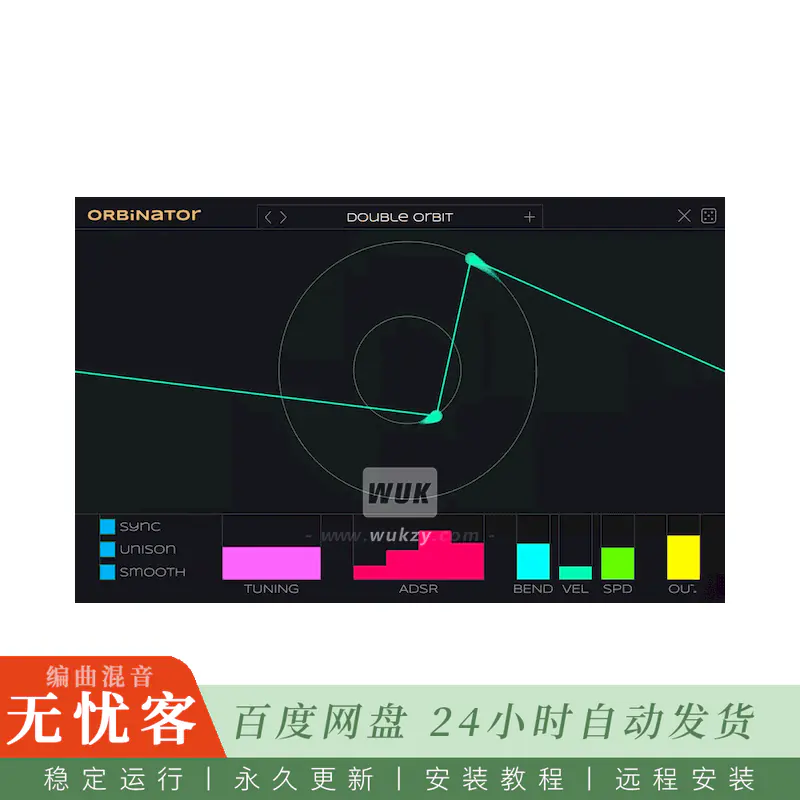
Orbinator是一个波表合成器,其中波表不是固定的-它们会发展。
放置一个或多个球,并给他们一个速度,方向和旋转半径。连接球的线描述了播放的波形的单个周期。因为球移动,波总是在改变形状。
该插件的灵感来自一种被称为扫描合成的晦涩方法,其中波表是从质量和弹簧的物理模型动态生成的。在Orbinator中,“物理模型” 由围绕圆圈旋转的点组成,它们之间有一个假想的字符串。
如何使用
双击窗口中的任意位置以添加新球。您最多可以添加8个orb。
将鼠标悬停在圆的中心附近,以显示执行以下操作的其他控件:
速度单击图标并向上或向下拖动以更改旋转速度和方向。双击以停止orb的移动。
移动拖动以重新定位圆。双击以删除此光球。
“大小” 向上或向下拖动以更改圆半径。双击以恢复默认大小。
主要控制:
同步如果启用,则orbs的旋转速度相对于BPM。速度范围从每转1/16音符 (快!) 到16巴 (慢)。
UNISON添加了额外的失谐声音。
平滑如果启用,则在orb位置之间使用平滑插值,否则使用线性插值。(即使启用了 “平滑”,UI也始终显示直线。)
调音音高调整在八度,半音,和美分。
ADSR您的典型信封控件。
对于变桨轮,以半音表示的变桨弯曲的弯曲量。
VEL速度灵敏度。如果禁用,则忽略速度。
SPD设置仿真速度,从0.1-10 ×。这会影响球的速度。您也可以使用mod轮。(注意: UI中的动画速度不会改变。)
OUT输出电平,以dB为单位。
支持的平台
免费下载适用于Mac (AU,VST3),Windows (VST3) 和Linux (VST3,LV2)。
由人类为KVR开发者挑战赛2026制作。
简介:
Matthijs Hollemans Orbinator (Wavetable Synth) v1.0.0 WiN Mac Linux [FREE]
FREE | Win Mac VST3 AU | 14 MB
Orbinator is a wavetable synth where the wavetables are not fixed — they evolve.
Place one or more orbs and give them a speed, direction and rotation radius. The line that connects the orbs describes a single cycle of the waveform that gets played. Because the orbs move, the wave is always changing shape.
This plug-in was inspired by an obscure method known as scanned synthesis where the wavetable is dynamically generated from a physical model of masses and springs. In Orbinator, the “physical model” consists of dots spinning around circles with an imaginary string between them.
How to use
Double-click anywhere in the window to add a new orb. You can add up to 8 orbs.
Hover near the center of a circle to reveal additional controls that do the following:
SPEED Click on the icon and drag up or down to change the rotation speed and direction. Double-click to stop the orb from moving.
MOVE Drag to reposition the circle. Double-click to delete this orb.
SIZE Drag up or down to change the circle radius. Double-click to restore default size.
Main controls:
SYNC If enabled, the rotation speed of the orbs is relative to the BPM. Speeds range from one 1/16th note per revolution (fast!) to 16 bars (slow).
UNISON Adds extra detuned voices.
SMOOTH If enabled, uses smooth interpolation between the orb positions, otherwise uses linear interpolation. (The UI always shows straight lines even if smooth is enabled.).
TUNING Pitch adjustment in octaves, semitones, and cents.
ADSR Your typical envelope controls.
BEND Amount of pitch bend in semitones, for the pitch wheel.
VEL Velocity sensitivity. If off, velocity is ignored.
SPD Sets the simulation speed, from 0.1 – 10×. This affects the speed of the orbs. You can also use the mod wheel for this. (Note: The animation speed in the UI doesn’t change.).
OUT Output level in dB.
Supported platforms
Free download for Mac (AU, VST3), Windows (VST3), and Linux (VST3, LV2).
Made by a human for the KVR Developer Challenge 2026.

评论0