
简介:
Cymatics SKETCH VSTi VSTi3 WiN MAC [免费]
WiN / MAC | 22.12 MB / 38.76 MB
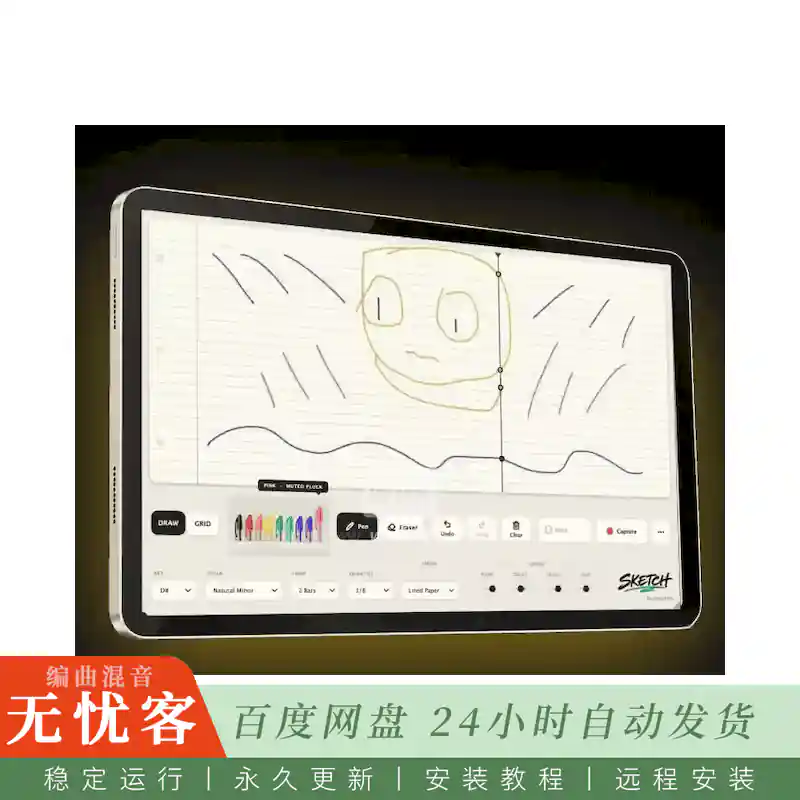
草图: 将图纸变成旋律的乐器插件
Cymatics SKETCH将您绘制的任何内容变成旋律。
选择您的密钥和比例,选择一支彩色笔,然后在页面上绘制线条,曲线,图案或完全随机的形状。
使旋律没有过度思考他们
有时,制作过程中最困难的部分是记下第一个想法。你打开钢琴卷,点击几分钟,一切都开始听起来太熟悉了。
SKETCH通过将旋律创作变成视觉,即时和不可预测的东西来打破这种模式。您可以考虑形状,运动和方向,而不是考虑单个音符。
画出旋律的感觉,让SKETCH将其转化为音乐。
草图到底是如何工作的?
首先选择项目的音阶和音阶。
接下来,选择您的循环长度和量化,以控制您的绘图如何随节奏移动。
选择一个彩色的笔,并开始绘制。每个笔连接到不同的声音,所以改变颜色瞬间给你的旋律一个新的声音。
当您想要更多控制时,打开网格,或者当您想要自由绘制时,将其关闭。您可以擦除各个部分,撤消更改,清除页面,并继续重塑想法,直到感觉正确为止。
简介:
Cymatics SKETCH VSTi VSTi3 WiN MAC [FREE]
WiN / MAC | 22.12 MB / 38.76 MB
SKETCH: The Instrument Plugin That Turns Drawings Into Melodies
Cymatics SKETCH turns anything you draw into a melody.
Choose your key and scale, pick a colored pen, then draw lines, curves, patterns, or completely random shapes across the page.
Make Melodies Without Overthinking Them
Sometimes the hardest part of producing is getting the first idea down. You open the piano roll, click around for a few minutes, and everything starts sounding too familiar.
SKETCH breaks you out of that pattern by turning melody creation into something visual, immediate, and unpredictable. Instead of thinking about individual notes, you can think in shapes, motion, and direction.
Draw what the melody should feel like and let SKETCH translate it into music.
How Does SKETCH Work Exactly?
Start by choosing the key and musical scale of your project.
Next, select your loop length and quantization to control how your drawing moves with the rhythm.
Pick one of the colored pens and begin drawing. Each pen is connected to a different sound, so changing colors instantly gives your melody a new voice.
Switch on the grid when you want more control, or leave it off when you want to draw freely. You can erase individual sections, undo changes, clear the page, and continue reshaping the idea until it feels right.

评论0