
简介:
Spectro 1.6 macOS U2B [EDiSO]
团队EDiSO | 日期: 2026.9 | 18 MB
光谱
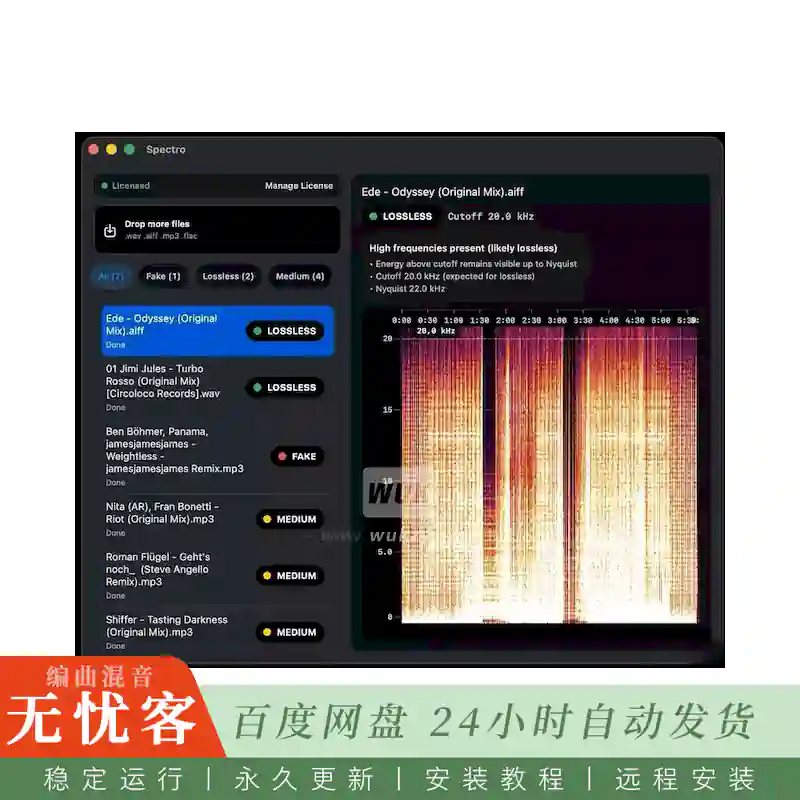
是一个macOS音频分析工具,通过扫描WAV,AIFF,FLAC和MP3文件的频谱截止来检测虚假的无损轨道,这些频谱截止揭示了伪装成高质量音频的有损源。专为dj和收藏家而设计,它可以完全脱机运行,批量处理多达100个文件,与Finder集成,并在几秒钟内返回清晰的无损,虚假或中等判决。
一次扫描整个资料库。
将一份来自Beatport的下载文件夹或USB促销曲目丢进来。Spectro同时处理多达100个文件,并为每个文件提供即时判决。
虚假的无损文件,已用红色标记。
就在Finder中。
Spectro将颜色标签直接写入macOS Finder中的文件。打开您的DJ池文件夹,每个轨道已经标记-没有应用程序保持打开,没有重命名,没有额外的步骤。
Spectro是一个应用程序,可以解决发烧友和dj的特定和重要问题: 它确定您的WAV,AIFF,FLAC,ALAC音频文件是真正的无损或压缩的mp3伪装成高分辨率。
Spectro解决的问题:
带有.的文件flac或。wav扩展不保证质量。许多在线平台,促销频道和Bandcamp下载都具有已转换为无损格式的MP3文件。虽然文件大小增加了,但音频本身仍然是压缩状态。Spectro使用快速傅立叶变换 (FFT) 分析实际音频信号频谱,而不是元数据,以提供准确的判决。
它的工作原理。
使用该应用程序非常简单,包括三个步骤:
将文件或文件夹拖放到应用程序窗口中。Spectro支持FLAC,WAV,AIFF,ALAC,MP3和AAC格式。无需导入或移动任何内容。
对每个文件做出裁决。结果实时显示: 无损 (真实质量) 、中等 (中等) 或假 (假)。还会显示置信百分比、估计比特率和简要诊断。
根据结果采取行动。您可以过滤掉虚假文件,将其移至垃圾箱,或在做出决定之前打开完整的频谱图进行详细分析。
功能:
• 批量处理:该应用程序专为处理大型媒体库而设计。您可以加载1到20,000个文件。Spectro在M系列芯片上同时处理多达100个文件,并根据判决对结果进行分组。
• Finder集成: Spectro可以自动为文件分配Finder颜色标签。这让您无需打开应用,就能在文件夹中直接查看“有问题”的文件。
• 播放列表导入: 从Rekordbox XML文件或任何M3U/M3U8播放列表 (Traktor和VirtualDJ兼容) 导入。未来将提供对Serato的支持。
• 自动模式 (监视文件夹): 您可以为Spectro指定任何文件夹。添加到其中的新曲目将被自动分析,并可以选择在完成时发送通知。
什么是新的v1.6
AI屏幕测试版,比特率chrome和更流畅的库
›
折叠释放
可选的AI屏幕 (默认情况下为关闭状态) 标记可能的AI生成的音频以供审核,而无需更改判决。Bitrate chrome对于不明确的高比特率轨道更加清晰。大型库在扫描期间保持可用。无检测-引擎更改。
系统要求
• macOS 13或更高版本。
• Apple芯片或Intel Core处理器
安装:
1. Mount DMG
2.拖动。应用程序到应用程序文件夹
3.利润。
简介:
Spectro 1.6 macOS U2B [EDiSO]
TEAM EDiSO | Date: 2026.9 | 18 MB
Spectro
is a macOS audio analysis tool that detects fake lossless tracks by scanning WAV, AIFF, FLAC, and MP3 files for spectral cutoffs that reveal lossy sources disguised as high-quality audio. Built for DJs and collectors, it runs fully offline, batch-processes up to 100 files, integrates with Finder, and returns clear LOSSLESS, FAKE, or MEDIUM verdicts in seconds.
Scan your entire library at once.
Drop a folder of Beatport downloads or USB promo tracks. Spectro processes up to 100 files simultaneously and delivers an instant verdict for each one.
Fake lossless files, tagged in red.
Right in Finder.
Spectro writes color tags directly to your files in macOS Finder. Open your DJ Pool folder and every track is already marked — no app to keep open, no renaming, no extra steps.
Spectro is an app that solves a specific and important problem for audiophiles and DJs: it determines whether your WAV, AIFF, FLAC, and ALAC audio files are truly lossless or compressed MP3s disguised as high-resolution.
The problem Spectro solves:
Files with .flac or .wav extensions don’t guarantee quality. Many online platforms, promo channels, and Bandcamp downloads feature MP3 files that have been converted to lossless format. While the file size increases, the audio itself remains compressed. Spectro analyzes the actual audio signal spectrum, not metadata, using a fast Fourier transform (FFT), to provide an accurate verdict.
How it works.
Using the app is extremely simple and consists of three steps:
Drag and drop files or folders into the application window. Spectro supports FLAC, WAV, AIFF, ALAC, MP3, and AAC formats. No need to import or move anything.
Get a verdict on each file. The result is displayed in real time: LOSSLESS (real quality), MEDIUM (medium), or FAKE (fake). The confidence percentage, estimated bitrate, and a brief diagnosis are also displayed.
Act based on the results. You can filter out fake files, move them to the Trash, or open the full spectrogram for detailed analysis before making a decision.
Features:
• Batch processing: The application is designed for working with large libraries. You can load from 1 to 20,000 files. Spectro processes up to 100 files simultaneously on M-series chips and groups the results by verdicts.
• Finder Integration: Spectro can automatically assign Finder color labels to files. This allows you to see “bad” files right in your folders without even opening the app.
• Playlist Import: Import from Rekordbox XML files or any M3U/M3U8 playlists (Traktor and VirtualDJ compatible). Serato support is promised in the future.
• Automatic mode (Watch Folder): You can specify any folder for Spectro. New tracks added to it will be analyzed automatically, with the option to send notifications upon completion.
What’s New v1.6
AI Screen Beta, bitrate chrome, and a smoother library
›
Collapse release
Optional AI Screen (off by default) flags possible AI-generated audio for review without changing the Verdict. Bitrate chrome is clearer for ambiguous high-bitrate tracks. Large libraries stay usable during a scan. No detection-engine changes.
System Requirements
• macOS 13 or later.
• Apple Silicon or Intel Core processor
Installation:
1. Mount DMG
2. Drag .app to Applications folder
3. Profit.
(wuk).webp)
(wuk).webp)
(wuk).webp)


评论0